

At a glance
What it is for
Each provider charges for what it sends: an SMS per segment, a WhatsApp per message, an email per message. A rate records that price per channel, provider and country from a date. Horizon prices every send with the rate in force when the provider accepts it, and the dashboard adds those costs up. When a provider changes its price, you add a new rate from the date it applies; the old one is kept.How to get there
- Sidebar: Notifications › Settings › Channel rates.
What you see
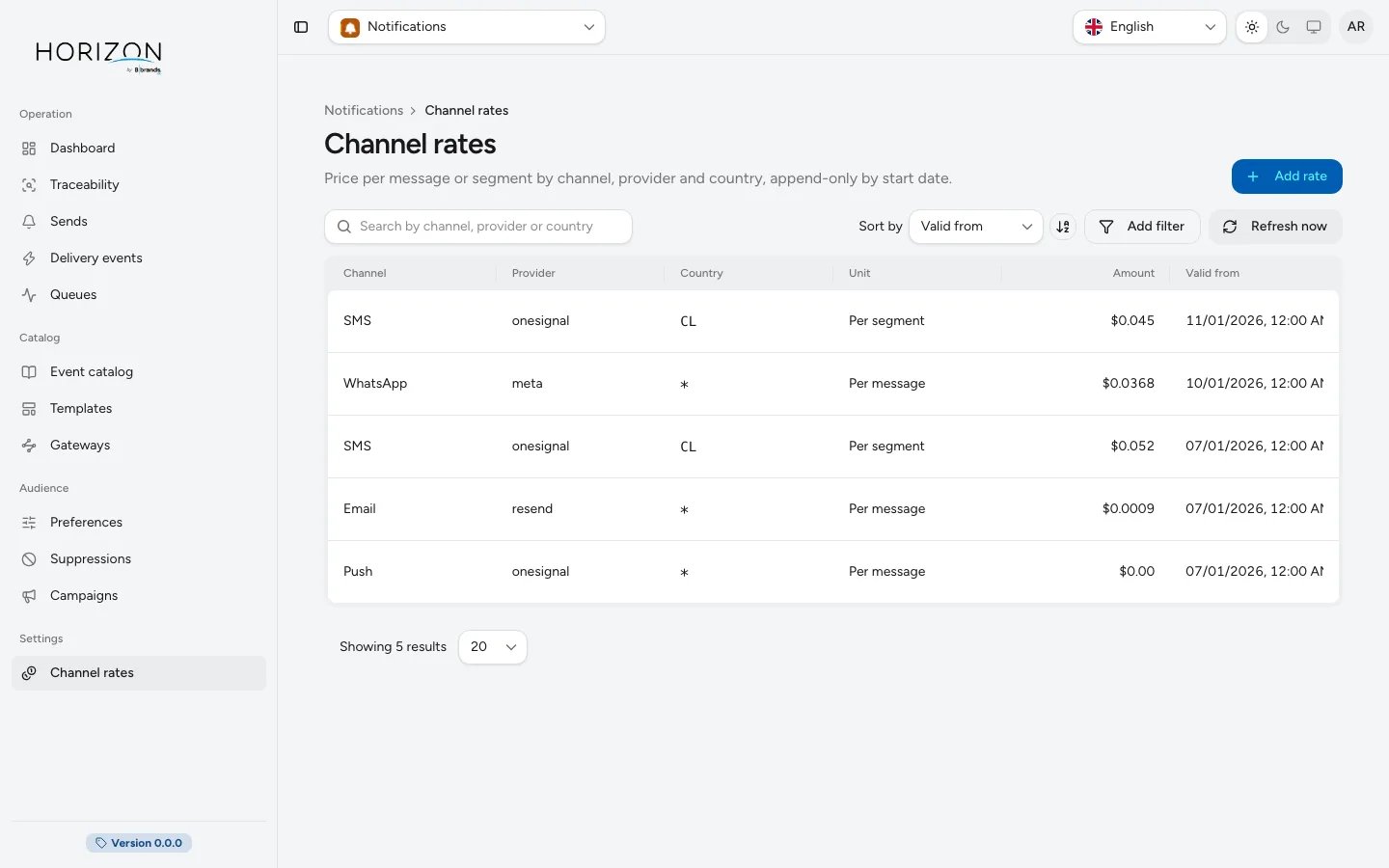
The rate list: one row per price, newest start date first.
In the example, the SMS price changed on 11/01/2026: sends until 10/31 were priced at 0.052 and from 11/01 at
0.045. Both rows stay.
Step by step
Add a new price
1
Open the form
Press Add rate. The “New channel rate” dialog opens.
2
Channel and provider
Pick the Channel and the Provider (Horizon, Resend, OneSignal or Meta).
3
Country and unit
For SMS, type in Country (ISO or *) the two-letter code (
CL) or * for every country. Other channels
have no country field: the form notes that only SMS is priced by country and saves the rate for every country
(*). Pick the Unit: Per segment for SMS charged by part, Per message for the rest.4
Amount, currency and date
Type the Amount (0 or more, with a decimal point), the Currency as three letters (
USD) and Valid
from, the date and time the new price applies.5
Add
Press Add rate. You see Rate added: “Sends from its start date are priced with it.”
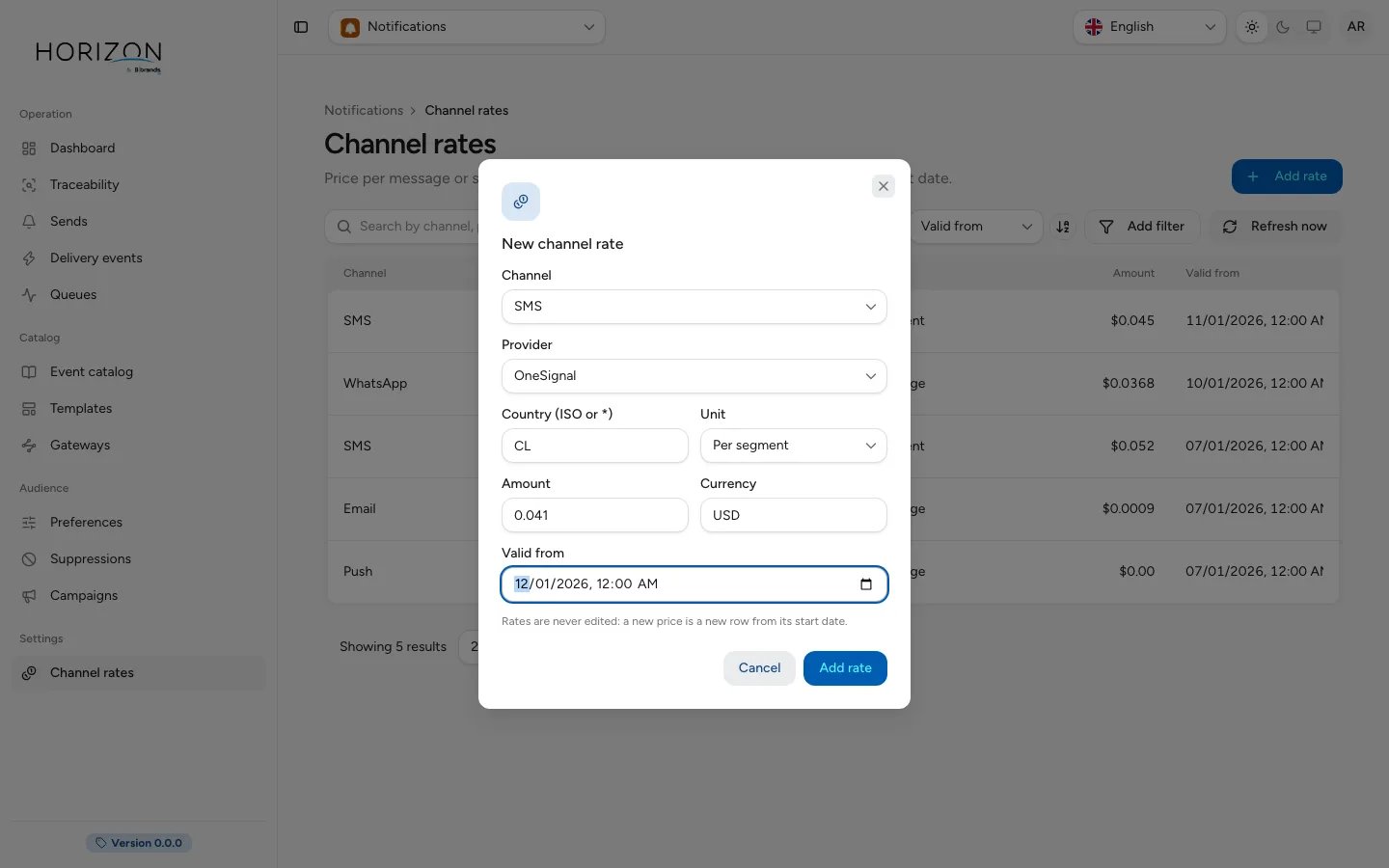
A new SMS price for Chile from December 1.
Correct a wrong price
Rates are not edited or deleted. If you typed a wrong price, add the right one with a Valid from just after the wrong one: the newest row in force wins. Sends already priced keep their cost.Business rules
States and messages
Errors
Why it works this way
Keeping every price with its start date means the cost of last month never changes when the provider raises its price this month: each send is priced once, with the rate in force when it went out. That is also why a rate is never edited: changing an old row would make the history of costs disagree with what was paid.Technical detail
FAQ and support cases
The dashboard shows no cost for push
The dashboard shows no cost for push
Push and in-app usually cost nothing. If the provider charges them, add the rate; only sends after its start are
priced.
I added the new price late; are last week's sends wrong?
I added the new price late; are last week's sends wrong?
They keep the old price. A new rate with a past Valid from prices only sends that go out after you add it.
Why is the dashboard cost in USD if a rate is in CLP?
Why is the dashboard cost in USD if a rate is in CLP?
The headline cost uses the currency with the most priced sends. The cost per domain shows each currency apart.
Can I set a price for email in Chile only?
Can I set a price for email in Chile only?
No. Only SMS is priced by country: email has one rate for every country, and the form shows no country for it.