Which notification messages end up as failed messages, how to read their error and how to get them out again with Replay, including what happens when their send already ended Failed.
notification-lane:operate (see and replay the notification ones); notification:resend too when the send of the message already ended Failed; queue-event:find-all also lets you see them
Feature flag
None
Last verified
2026-11-12 against develop (679a4e0c5) plus PR for issue #2201
What it is for
A failed message (“mensaje fallido”, “dead letter”) is a notification the platform could not hand to the provider
after every automatic try, or one that arrived broken. It does not disappear: it stays in this list with its last
error, so you can see what failed, fix the cause and get the notification out again with Replay.
How to get there
Open Operation › Queues and scroll to the Failed messages card, below Lanes.
What you see
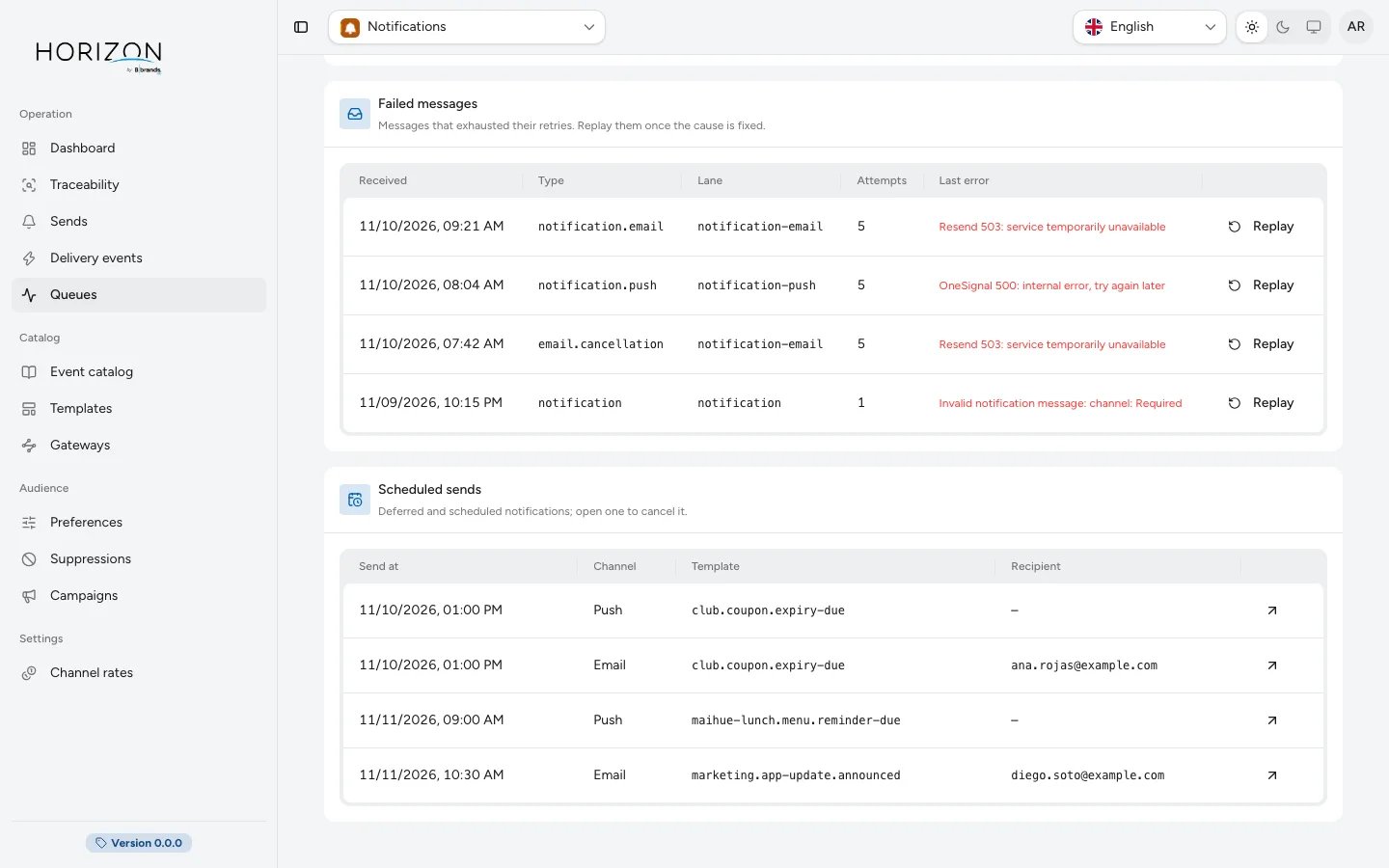
Four failed messages: an email, a push and a subscription email whose provider was down, and a malformed message.
#
Element
What it does
1
Received
When the message entered the queue
2
Type
The message type: notification.email, notification.push, … one per channel; notification alone when it carried no channel; email.cancellation, email.downgrade, email.product.new, … for the subscription emails that travel on the email lane
3
Lane
The lane it was on
4
Attempts
How many times the platform tried. 5 is the normal limit; 1 means it was refused at once
5
Last error
What the provider or the platform answered the last time
6
Replay
Sends the message again once, after a confirmation. If its send already ended Failed, it retries that send, as Retry does in Sends
The list shows the 20 most recent.
Step by step
Understand a failed message
1
Read the error
A 503, a 500 or “temporarily unavailable” means the provider was down: the message itself is fine. An
“Invalid notification message” means the message was broken and needs the technology team.
2
Check the provider
If several messages of the same lane failed in the same minutes, it was an outage of that provider. Check its
status before acting.
3
Find the send
Every failed delivery also marks its send as Failed and fires the fallback channel if the event has one.
Find the customer’s send in Operation › Sends or Operation › Traceability.
Replay a failed message
1
Make sure the cause is gone
The provider is up again, or the technology team fixed the broken message. Replaying before that only fails
again.
2
Press Replay
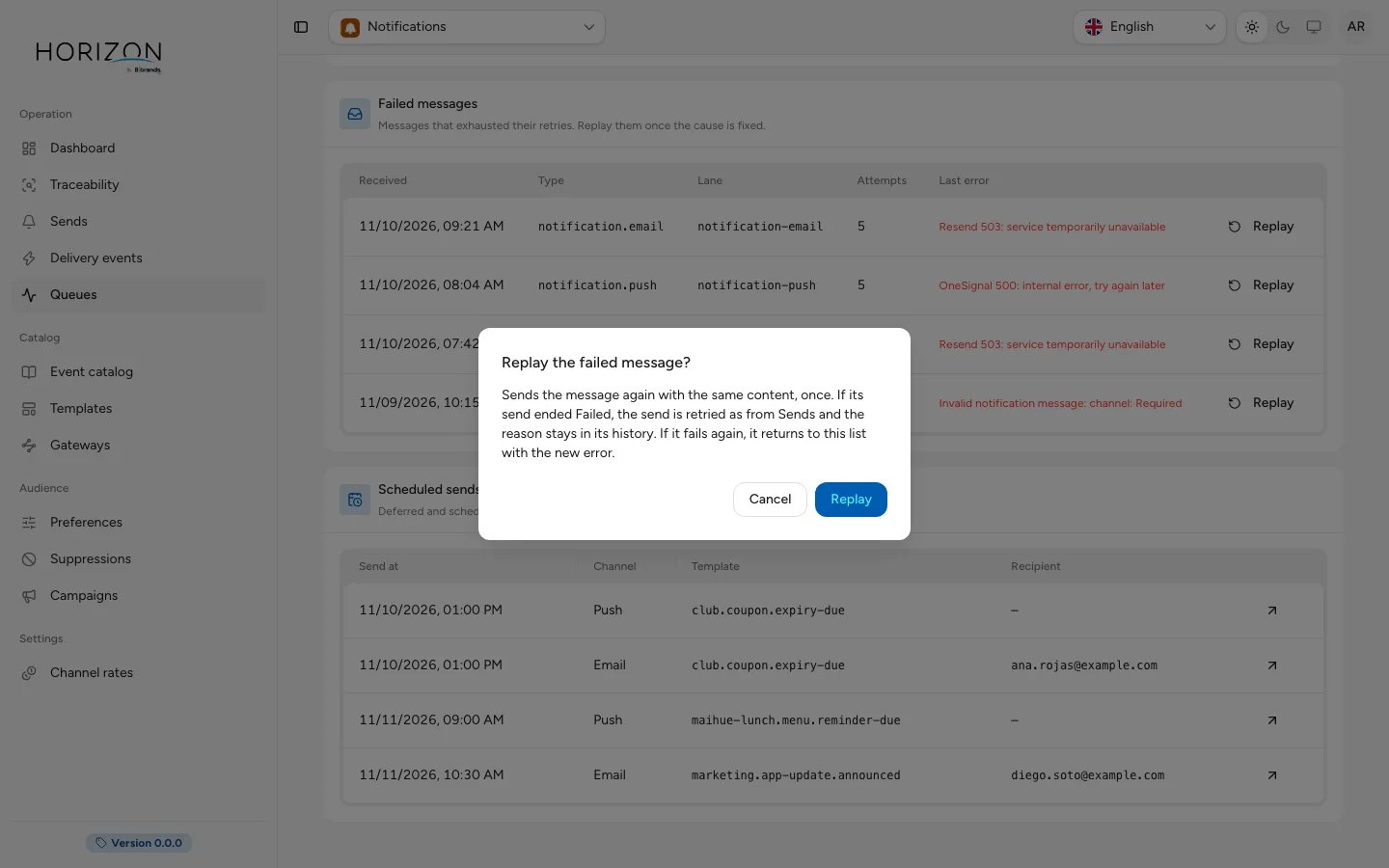
On the message’s row, press Replay. The dialog Replay the failed message? explains: “Sends the message
again with the same content, once. If its send ended Failed, the send is retried as from Sends and the reason
stays in its history. If it fails again, it returns to this list with the new error.”
The replay confirmation.
3
Confirm
Press Replay. You see Replay started · “The message is back on its lane.” and the row leaves the list.
4
Check the send
In Operation › Sends, the send moves to Queued and then to Sent. When its send had ended
Failed (the usual case, because using up the retries marks it Failed), its history shows the retry with
the reason “Reprocesado desde Mensajes fallidos”. If the message fails again, it comes back to this list with the
new error.
Retry it or resend it, with your own reason. This is still valid, and it is the way when your role has
notification:resend but not notification-lane:operate. The failed message stays in this list until someone
replays it or the technology team removes it.
Business rules
ID
Rule
R-01
The platform tries each message up to 5 times, waiting longer each time (from 5 seconds up to a few minutes). Network or proxy errors get up to 12 tries over about 45 minutes before giving up
R-02
After the last try the message becomes a failed message, its send is marked Failed and the event’s fallback channel fires, if it has one
R-03
A send the provider already accepted is never marked failed, and never fires a fallback
R-04
A malformed message is not retried: it goes straight to this list with the validation error
R-05
A failed message stays in the list until it is replayed or removed by the technology team; the send does not go out on its own, and the automatic requeue of stalled messages never touches failed messages
R-06
The list shows every failed message of a notification lane (notification and notification-<channel>), whatever its type: the notification messages (notification…) and the subscription emails that travel on those lanes (email.cancellation, email.downgrade, email.product.new, …)
R-07
Replaying never repeats a delivered send: a message whose send the provider already accepted, or whose send is no longer Failed, is skipped when it reaches the provider step. It never touches payments or webhooks
R-08
Each press of Replay gives the message exactly one more attempt. The attempt count is kept, so a new failure sends it back to this list at once: it never loops
R-09
When the send of the message already ended Failed, Replay retries that send as Retry does: the send goes back to Queued, a new message is published and the reason “Reprocesado desde Mensajes fallidos” stays in its history. This also needs notification:resend
R-10
Two operators pressing Replay on the same row publish it only once: the second one gets “it was already replayed”
R-11
Replaying closes the message’s open dead letters with the operator who replayed it and the note “Replayed by an operator from Horizon Enterprise”. If the publish fails, the message goes back to this list
R-12
Financial message types need an explicit financial confirmation; none of them travels on a notification lane
States and messages
State
What you see
Why
What to do
No failures
”No failed messages.”
Every message got out
Nothing
Failed message
A row with Attempts 5 and the provider error
The provider refused or did not answer
Check the provider, then press Replay
Broken message
Attempts 1 and “Invalid notification message…”
The message arrived incomplete
Escalate to the technology team
Replayed
Replay started · “The message is back on its lane.” and the row leaves the list
The message was published again, or its send was retried
Check the send in Sends
Back in the list
The same message with a new Last error
The new attempt failed too
Check the cause again before replaying
Already replayed
Could not replay · “Queue event ’…’ is no longer in the dead letters; it was already replayed”
Someone replayed it first
Refresh the list
No button
The rows have no Replay
Your role lacks notification-lane:operate
Ask a Notification Operator
Errors
Message
Cause
Backend code
Support action
Could not replay · “Queue event ’…’ is no longer in the dead letters; it was already replayed”
Missing notification-lane:operate; the message is not on a notification lane; or its send ended Failed and your role lacks notification:resend
403
Ask for the Notification Operator role, or retry the send from Sends
Could not replay asking for a financial confirmation
The message is of a financial type (requires_confirm_financial)
409
Escalate to the technology team
Could not replay with a server error
Server error; the message stays in the list
5xx
Try again later
Why it works this way
After the last try the send is Failed, its fallback fires and the message waits in Failed messages.
Providers fail now and then for a few seconds, so the platform retries on its own before giving up. Keeping the
messages that still failed, instead of dropping them, lets the operator see the cause and decide; marking the send
as failed at the same time makes the customer’s history honest and lets the fallback channel try another way.Because the send is already Failed when its message lands here, republishing the message alone would be skipped
by the delivery step, which never repeats a failed send. That is why Replay retries the send itself, with a fixed
reason in its history, and asks for the same permission as Retry.
Technical detail
Aspect
Detail
Screen
notification-operations-screen.tsx (DeadLettersSection), filter status|eq|dlq,lane|ilike|notification% (NOTIFICATION_DEAD_LETTER_FILTERS), 20 rows by last update; the list refreshes after a replay
Read
GET /api/v3/queue/event, limited to the notification lanes for operators (D-32)
Replay
POST /api/v3/queue/event/{id}/requeue: queue-event:requeue or, for a notification lane, notification-lane:operate; requeueQueueEvents with allowDeadLetter reopens one dlq row (dlq → enqueued, one conditional update), republishes it with the same queue_event_id, adds 1 to attempts_replay_count, records a queue_replay_job and resolves its open queue_dead_letter rows; on a publish failure the row goes back to dlq
Failed send
lib/endpoint/queue-event/requeue/notification-dead-letter-replay.ts (D-79): a notification… message whose send is failed is retried (failed → queued, horizon.queued event with retry: true, audit_log), needs notification:resend; workflow reopenDeadLetter, closeDeadLetterAsRetried (dlq → processed, context replayed_as: notification-retry) and resolveDeadLetters in queue-event-workflow.service.ts
Retries
createDefaultQueueRetry(DEFAULT_MAX_ATTEMPTS = 5) and INFRA_MAX_ATTEMPTS = 12 in lib/queue/common/queue-consumer-wrapper.ts; exhaustion in handleExhaustedNotification (lib/queue/notification/handlers/notification-unified.handler.ts)
messages/{es,en}.json › modules.notification.operations and modules.notification.operations.replayDialog
FAQ and support cases
The provider was down for an hour. Do I have to replay every message?
The sends that failed during the outage are marked Failed and their fallback channel already fired. Replay
the ones that matter (for example a security code is useless an hour later, a contract signed is not), here or
with Retry in Operation › Sends.
Can Replay send a notification twice?
No. Each press gives one attempt, two presses on the same row publish once, and a send the provider already
accepted is skipped.
Why does a failed message have only 1 attempt?
It was malformed, so retrying could not fix it. Send the error to the technology team.
Does a failed message mean the customer got nothing?
Not always: if the event has a fallback channel (for example the email of a push), that one went out. Check the
occurrence in Operation › Traceability.
Links to the Sends and Traceability pages and to the incident guides
2026-11-12
Replay works (issue #2201 fixed): it republishes the message once or, when its send ended Failed, retries the send; new dialog copy; the list shows the subscription emails of the notification lanes
Was this page helpful?
{"docsConfig":{"theme":"mint","$schema":"https://mintlify.com/docs.json","name":"B Brands Docs","colors":{"primary":"#0D5993","light":"#0789C9","dark":"#0D5993"},"logo":{"light":"https://mintcdn.com/bbrands/1xnT5Vb9hIIJ3k79/logo/bbrands-lab-light.svg?fit=max\u0026auto=format\u0026n=1xnT5Vb9hIIJ3k79\u0026q=85\u0026s=88608895ccbfda54985581ee6e49b55f","dark":"https://mintcdn.com/bbrands/1xnT5Vb9hIIJ3k79/logo/bbrands-lab-dark.svg?fit=max\u0026auto=format\u0026n=1xnT5Vb9hIIJ3k79\u0026q=85\u0026s=2ec709f45e98d62d6cc6a8e23a735c5d"},"favicon":"https://mintcdn.com/bbrands/SChHqGy4T8DLbxhI/favicon.svg?fit=max\u0026auto=format\u0026n=SChHqGy4T8DLbxhI\u0026q=85\u0026s=3364f2bbd048ffc2d9ba3f4ec3de1d4f","api":{"openapi":["api-reference/maihue/lead/openapi.yaml","api-reference/auth/auth/register-migration-openapi.yaml","api-reference/auth/auth/verify-email-openapi.yaml","api-reference/webhook/openapi.yaml","api-reference/permission/api-key/openapi.yaml","api-reference/notification/notification/openapi.yaml","api-reference/notification/notification/read-openapi.yaml","api-reference/notification/inbox/openapi.yaml","api-reference/notification/onesignal-webhook/openapi.yaml","api-reference/maihue/onboarding/openapi.yaml","api-reference/maihue/onboarding/portal-openapi.yaml","api-reference/maihue/form/openapi.yaml","api-reference/maihue/form-answer/openapi.yaml","api-reference/maihue/form-question/openapi.yaml","api-reference/maihue/form-workflow/openapi.yaml","api-reference/maihue/form-workflow-step/openapi.yaml","api-reference/maihue/lead-answer/openapi.yaml","api-reference/permission/api-key-permission/openapi.yaml","api-reference/notification/preference/openapi.yaml","api-reference/notification/platform/openapi.yaml","api-reference/notification/platform/metric-openapi.yaml","api-reference/notification/template-version/openapi.yaml"]},"navbar":{"links":[{"href":"mailto:developers@bbrands.io","label":"Support"}],"primary":{"type":"button","label":"B Brands Lab","href":"https://www.bbrands.io"}},"footer":{"socials":{"github":"https://github.com/bbrandslab","website":"https://www.bbrands.io"}},"styling":{"latex":false},"navigation":{"languages":[{"language":"en","default":true,"href":"introduction"},{"language":"es","href":"es/introduction"}]}},"deployment":{"deploymentMetadataValue":{"subdomain":"bbrands","hasAudioNarration":false,"actualSubdomain":"bbrands","customDomains":["docs.bbrands.io"],"gitSource":{"type":"github","owner":"bbrandslab","repo":"bbrands-monorepo","deployBranch":"develop","contentDirectory":"backend/horizon-docs","isPrivate":true,"mountPath":"","label":""},"feedback":{"issues":false,"thumbs":true},"entitlements":{},"buildId":"6b08c32dc560574c778c9718","clientVersion":"0.0.4340","searchFilterCounts":[{"language":"default","tag":"Schemas","count":482},{"language":"default","tag":"API Reference","count":274},{"language":"en","tag":"Horizon Enterprise","count":185},{"language":"es","tag":"Horizon Enterprise","count":185},{"language":"en","tag":"Notifications","count":156},{"language":"es","tag":"Notificaciones","count":156},{"language":"default","tag":"General","count":101},{"language":"default","tag":"Maihue","count":97},{"language":"en","tag":"Events","count":95},{"language":"es","tag":"Eventos","count":95},{"language":"en","tag":"Notification","count":73},{"language":"default","tag":"Account","count":63},{"language":"en","tag":"API Reference","count":61},{"language":"en","tag":"Documentation","count":55},{"language":"es","tag":"Documentación","count":55},{"language":"default","tag":"Product","count":54},{"language":"default","tag":"Webhook","count":49},{"language":"default","tag":"MaihueStreet","count":48},{"language":"en","tag":"Customer portal","count":47},{"language":"es","tag":"Portal de clientes","count":47},{"language":"default","tag":"Code","count":43},{"language":"default","tag":"Permission","count":32},{"language":"es","tag":"Acceso","count":26},{"language":"es","tag":"Primeros pasos","count":21},{"language":"en","tag":"Catalog and templates","count":20},{"language":"es","tag":"Catálogo y plantillas","count":20},{"language":"en","tag":"BBrands Lab","count":19},{"language":"en","tag":"MaihueGo","count":19},{"language":"es","tag":"BBrands Lab","count":19},{"language":"es","tag":"MaihueGo","count":19}]},"assistantConfig":{},"basePath":"","hasChatPermissions":false,"hasWebMcpPermissions":false,"toggles":[{"name":"kill-isr","enabled":true,"variant":{"name":"disabled","enabled":false,"feature_enabled":true},"impressionData":false},{"name":"custom-rbac-roles","enabled":true,"variant":{"name":"disabled","enabled":false,"feature_enabled":true},"impressionData":false},{"name":"agent-mintlify-slack","enabled":true,"variant":{"name":"disabled","enabled":false,"feature_enabled":true},"impressionData":false},{"name":"agent-integrations-settings","enabled":true,"variant":{"name":"disabled","enabled":false,"feature_enabled":true},"impressionData":false},{"name":"rbac-expansion","enabled":true,"variant":{"name":"disabled","enabled":false,"feature_enabled":true},"impressionData":false},{"name":"automations-pr-grouping","enabled":true,"variant":{"name":"disabled","enabled":false,"feature_enabled":true},"impressionData":false},{"name":"custom-prefix","enabled":true,"variant":{"name":"disabled","enabled":false,"feature_enabled":true},"impressionData":false},{"name":"analytics-v7","enabled":true,"variant":{"name":"disabled","enabled":false,"feature_enabled":true},"impressionData":false},{"name":"user-flows-analytics","enabled":true,"variant":{"name":"disabled","enabled":false,"feature_enabled":true},"impressionData":false},{"name":"no-publish-flow","enabled":true,"variant":{"name":"disabled","enabled":false,"feature_enabled":true},"impressionData":false},{"name":"snapshot-serving-live","enabled":true,"variant":{"name":"disabled","enabled":false,"feature_enabled":true},"impressionData":false},{"name":"stripTemperatureMiddleware","enabled":true,"variant":{"name":"disabled","enabled":false,"feature_enabled":true},"impressionData":false},{"name":"support-platform-pylon-zendesk","enabled":true,"variant":{"name":"disabled","enabled":false,"feature_enabled":true},"impressionData":false},{"name":"snapshot-serving","enabled":true,"variant":{"name":"disabled","enabled":false,"feature_enabled":true},"impressionData":false},{"name":"instant-rollback","enabled":true,"variant":{"name":"disabled","enabled":false,"feature_enabled":true},"impressionData":false},{"name":"granular-notifications-server","enabled":true,"variant":{"name":"disabled","enabled":false,"feature_enabled":true},"impressionData":false},{"name":"granular-notifications","enabled":true,"variant":{"name":"disabled","enabled":false,"feature_enabled":true},"impressionData":false},{"name":"automations-fable","enabled":true,"variant":{"name":"disabled","enabled":false,"feature_enabled":true},"impressionData":false},{"name":"fixed-ai-action-pricing","enabled":true,"variant":{"name":"disabled","enabled":false,"feature_enabled":true},"impressionData":false},{"name":"site-roles","enabled":true,"variant":{"name":"disabled","enabled":false,"feature_enabled":true},"impressionData":false},{"name":"automation-resolve-merge-conflict","enabled":true,"variant":{"name":"disabled","enabled":false,"feature_enabled":true},"impressionData":false},{"name":"scoped-publishing","enabled":true,"variant":{"name":"disabled","enabled":false,"feature_enabled":true},"impressionData":false},{"name":"mintql","enabled":true,"variant":{"name":"disabled","enabled":false,"feature_enabled":true},"impressionData":false},{"name":"page-level-analytics","enabled":true,"variant":{"name":"disabled","enabled":false,"feature_enabled":true},"impressionData":false},{"name":"editor-version-history-v2","enabled":true,"variant":{"name":"disabled","enabled":false,"feature_enabled":true},"impressionData":false},{"name":"billing-page-v2","enabled":true,"variant":{"name":"disabled","enabled":false,"feature_enabled":true},"impressionData":false},{"name":"full-page-search","enabled":true,"variant":{"name":"disabled","enabled":false,"feature_enabled":true},"impressionData":false},{"name":"workspace-projects","enabled":true,"variant":{"name":"disabled","enabled":false,"feature_enabled":true},"impressionData":false},{"name":"fork-pr-previews","enabled":true,"variant":{"name":"disabled","enabled":false,"feature_enabled":true},"impressionData":false},{"name":"revalidation-jwt","enabled":true,"variant":{"name":"disabled","enabled":false,"feature_enabled":true},"impressionData":false},{"name":"hobby-abuse-scan","enabled":true,"variant":{"name":"disabled","enabled":false,"feature_enabled":true},"impressionData":false},{"name":"dashboard-inbox","enabled":true,"variant":{"name":"disabled","enabled":false,"feature_enabled":true},"impressionData":false},{"name":"turbopuffer-dual-write","enabled":true,"variant":{"name":"disabled","enabled":false,"feature_enabled":true},"impressionData":false},{"name":"approve-review-flow","enabled":true,"variant":{"name":"disabled","enabled":false,"feature_enabled":true},"impressionData":false},{"name":"editor-metadata","enabled":true,"variant":{"name":"disabled","enabled":false,"feature_enabled":true},"impressionData":false},{"name":"turbopuffer-serve","enabled":true,"variant":{"name":"disabled","enabled":false,"feature_enabled":true},"impressionData":false},{"name":"live-agents","enabled":true,"variant":{"name":"disabled","enabled":false,"feature_enabled":true},"impressionData":false},{"name":"starter-pricing","enabled":true,"variant":{"name":"control","enabled":true,"payload":{"type":"string","value":"control"},"feature_enabled":true},"impressionData":false},{"name":"llms-txt-v2","enabled":true,"variant":{"name":"disabled","enabled":false,"feature_enabled":true},"impressionData":false},{"name":"wildcard-email-auth","enabled":true,"variant":{"name":"disabled","enabled":false,"feature_enabled":true},"impressionData":false}],"starterQuestions":[],"googleFontsInlined":false},"customCss":[{"filePath":"style.css","content":"#navbar a img{height:3rem!important}.wave-status{align-items:baseline;border:1px solid;border-radius:0.75rem;display:flex;flex-wrap:wrap;font-size:0.875rem;gap:0.25rem 0.5rem;line-height:1.5;margin:0.75rem 0;padding:0.5rem 0.75rem}.wave-status a{border-bottom:0;color:inherit;font-weight:600;text-decoration:none}.wave-status a:hover{text-decoration:underline}.wave-status--active{background:#ecfdf5;border-color:rgb(16 185 129 / 0.35);color:#064e3b}.wave-status--planned{background:#fffbeb;border-color:rgb(245 158 11 / 0.35);color:#78350f}.dark .wave-status--active{background:rgb(16 185 129 / 0.1);color:#a7f3d0}.dark .wave-status--planned{background:rgb(245 158 11 / 0.1);color:#fde68a}"}]}
{"page":{"pagePath":"enterprise/notifications/operation/failed-messages","slug":"/enterprise/notifications/operation/failed-messages","pageMetadata":{"title":"Failed messages","sidebarTitle":"Failed messages","description":"Which notification messages end up as failed messages, how to read their error and how to get them out again with Replay, including what happens when their send already ended Failed.","status":"available","route":"/{locale}/notification/operations","permissions":["notification-lane:operate","notification:resend","queue-event:find-all"],"flags":[],"lastVerified":"2026-11-12","auditedCommit":"679a4e0c5","href":"/enterprise/notifications/operation/failed-messages"},"description":{"compiledSource":"\"use strict\";\nconst {jsx: _jsx} = arguments[0];\nconst {useMDXComponents: _provideComponents} = arguments[0];\nfunction _createMdxContent(props) {\n const _components = {\n p: \"p\",\n ..._provideComponents(),\n ...props.components\n };\n return _jsx(_components.p, {\n children: \"Which notification messages end up as failed messages, how to read their error and how to get them out again with Replay, including what happens when their send already ended Failed.\"\n });\n}\nfunction MDXContent(props = {}) {\n const {wrapper: MDXLayout} = {\n ..._provideComponents(),\n ...props.components\n };\n return MDXLayout ? _jsx(MDXLayout, {\n ...props,\n children: _jsx(_createMdxContent, {\n ...props\n })\n }) : _createMdxContent(props);\n}\nreturn {\n default: MDXContent\n};\n","frontmatter":{},"scope":{}},"pageType":"default","mdx":{"mdxSource":{"compiledSource":"\"use strict\";const{Fragment:_Fragment,jsx:_jsx,jsxs:_jsxs}=arguments[0];const{useMDXComponents:_provideComponents}=arguments[0];function _createMdxContent(props){const _components={a:`a`,code:`code`,li:`li`,p:`p`,strong:`strong`,tbody:`tbody`,td:`td`,th:`th`,thead:`thead`,tr:`tr`,ul:`ul`,..._provideComponents(),...props.components},{Accordion,AccordionGroup,Frame,Heading,OptimizedImage,Step,Steps,Table}=_components;if(!Accordion)_missingMdxReference(`Accordion`,true);if(!AccordionGroup)_missingMdxReference(`AccordionGroup`,true);if(!Frame)_missingMdxReference(`Frame`,true);if(!Heading)_missingMdxReference(`Heading`,true);if(!OptimizedImage)_missingMdxReference(`OptimizedImage`,true);if(!Step)_missingMdxReference(`Step`,true);if(!Steps)_missingMdxReference(`Steps`,true);if(!Table)_missingMdxReference(`Table`,true);return _jsxs(_Fragment,{children:[_jsx(Heading,{level:`2`,id:`at-a-glance`,children:`At a glance`}),`\n`,_jsxs(Table,{children:[_jsx(_components.thead,{children:_jsxs(_components.tr,{children:[_jsx(_components.th,{children:`Field`}),_jsx(_components.th,{children:`Value`})]})}),_jsxs(_components.tbody,{children:[_jsxs(_components.tr,{children:[_jsx(_components.td,{children:`Status`}),_jsx(_components.td,{children:_jsx(_components.strong,{children:`Available`})})]}),_jsxs(_components.tr,{children:[_jsx(_components.td,{children:`Route`}),_jsxs(_components.td,{children:[_jsx(_components.code,{children:`/{locale}/notification/operations`}),`, `,_jsx(_components.strong,{children:`Failed messages`}),` card`]})]}),_jsxs(_components.tr,{children:[_jsx(_components.td,{children:`Menu`}),_jsxs(_components.td,{children:[`Notifications › Operation › `,_jsx(_components.strong,{children:`Queues`}),` › `,_jsx(_components.strong,{children:`Failed messages`})]})]}),_jsxs(_components.tr,{children:[_jsx(_components.td,{children:`Role`}),_jsx(_components.td,{children:`Notification Admin and Notification Operator`})]}),_jsxs(_components.tr,{children:[_jsx(_components.td,{children:`Permission`}),_jsxs(_components.td,{children:[_jsx(_components.code,{children:`notification-lane:operate`}),` (see and replay the notification ones); `,_jsx(_components.code,{children:`notification:resend`}),` too when the send of the message already ended `,_jsx(_components.strong,{children:`Failed`}),`; `,_jsx(_components.code,{children:`queue-event:find-all`}),` also lets you see them`]})]}),_jsxs(_components.tr,{children:[_jsx(_components.td,{children:`Feature flag`}),_jsx(_components.td,{children:`None`})]}),_jsxs(_components.tr,{children:[_jsx(_components.td,{children:`Last verified`}),_jsxs(_components.td,{children:[`2026-11-12 against `,_jsx(_components.code,{children:`develop`}),` (`,_jsx(_components.code,{children:`679a4e0c5`}),`) plus PR for issue #2201`]})]})]})]}),`\n`,_jsx(Heading,{level:`2`,id:`what-it-is-for`,children:`What it is for`}),`\n`,_jsxs(_components.p,{children:[`A failed message (“mensaje fallido”, “dead letter”) is a notification the platform could not hand to the provider\nafter every automatic try, or one that arrived broken. It does not disappear: it stays in this list with its last\nerror, so you can see what failed, fix the cause and get the notification out again with `,_jsx(_components.strong,{children:`Replay`}),`.`]}),`\n`,_jsx(Heading,{level:`2`,id:`how-to-get-there`,children:`How to get there`}),`\n`,_jsxs(_components.ul,{children:[`\n`,_jsxs(_components.li,{children:[`Open `,_jsx(_components.a,{href:`/enterprise/notifications/operation/queues`,children:_jsx(_components.strong,{children:`Operation › Queues`})}),` and scroll to the `,_jsx(_components.strong,{children:`Failed messages`}),` card, below `,_jsx(_components.strong,{children:`Lanes`}),`.`]}),`\n`]}),`\n`,_jsx(Heading,{level:`2`,id:`what-you-see`,children:`What you see`}),`\n`,_jsx(Frame,{caption:`Four failed messages: an email, a push and a subscription email whose provider was down, and a malformed message.`,children:_jsx(OptimizedImage,{src:`https://mintcdn.com/bbrands/60Dos-kygsMSvNkG/images/enterprise-notifications-screens/queues/failed-messages.en.desktop.webp?fit=max\u0026auto=format\u0026n=60Dos-kygsMSvNkG\u0026q=85\u0026s=63c7d3c9c3576102f8272bad051b2941`,alt:`Failed messages card of the Queues screen: a table with Received, Type, Lane, Attempts and Last error, with rows notification.email on notification-email (5 attempts, Resend 503: service temporarily unavailable), notification.push on notification-push (5 attempts, OneSignal 500), email.cancellation on notification-email (5 attempts, Resend 503: service temporarily unavailable) and notification on notification (1 attempt, Invalid notification message: channel: Required), each with Replay; the Scheduled sends card below.`,\"data-og-width\":`1440`,width:`1440`,\"data-og-height\":`900`,height:`900`,\"data-path\":`images/enterprise-notifications-screens/queues/failed-messages.en.desktop.webp`,\"data-optimize\":`true`,\"data-opv\":`3`,srcset:`https://mintcdn.com/bbrands/60Dos-kygsMSvNkG/images/enterprise-notifications-screens/queues/failed-messages.en.desktop.webp?w=280\u0026fit=max\u0026auto=format\u0026n=60Dos-kygsMSvNkG\u0026q=85\u0026s=f61e18fd2f3d3e220193d2af55290739 280w, https://mintcdn.com/bbrands/60Dos-kygsMSvNkG/images/enterprise-notifications-screens/queues/failed-messages.en.desktop.webp?w=560\u0026fit=max\u0026auto=format\u0026n=60Dos-kygsMSvNkG\u0026q=85\u0026s=35779b960e9cfb7945485c42eae59fec 560w, https://mintcdn.com/bbrands/60Dos-kygsMSvNkG/images/enterprise-notifications-screens/queues/failed-messages.en.desktop.webp?w=840\u0026fit=max\u0026auto=format\u0026n=60Dos-kygsMSvNkG\u0026q=85\u0026s=41cb31ddff6982dba368ed43a5087e79 840w, https://mintcdn.com/bbrands/60Dos-kygsMSvNkG/images/enterprise-notifications-screens/queues/failed-messages.en.desktop.webp?w=1100\u0026fit=max\u0026auto=format\u0026n=60Dos-kygsMSvNkG\u0026q=85\u0026s=6637ec47ce05b537d7e7dd3eec5ef4d3 1100w, https://mintcdn.com/bbrands/60Dos-kygsMSvNkG/images/enterprise-notifications-screens/queues/failed-messages.en.desktop.webp?w=1650\u0026fit=max\u0026auto=format\u0026n=60Dos-kygsMSvNkG\u0026q=85\u0026s=51f37fdfd5c3ee4fb545d516d85a82d4 1650w, https://mintcdn.com/bbrands/60Dos-kygsMSvNkG/images/enterprise-notifications-screens/queues/failed-messages.en.desktop.webp?w=2500\u0026fit=max\u0026auto=format\u0026n=60Dos-kygsMSvNkG\u0026q=85\u0026s=7d3db51eaf173efd0b48aadf9d52e575 2500w`})}),`\n`,_jsxs(Table,{children:[_jsx(_components.thead,{children:_jsxs(_components.tr,{children:[_jsx(_components.th,{children:`#`}),_jsx(_components.th,{children:`Element`}),_jsx(_components.th,{children:`What it does`})]})}),_jsxs(_components.tbody,{children:[_jsxs(_components.tr,{children:[_jsx(_components.td,{\"data-numeric\":`true`,children:`1`}),_jsx(_components.td,{children:_jsx(_components.strong,{children:`Received`})}),_jsx(_components.td,{children:`When the message entered the queue`})]}),_jsxs(_components.tr,{children:[_jsx(_components.td,{\"data-numeric\":`true`,children:`2`}),_jsx(_components.td,{children:_jsx(_components.strong,{children:`Type`})}),_jsxs(_components.td,{children:[`The message type: `,_jsx(_components.code,{children:`notification.email`}),`, `,_jsx(_components.code,{children:`notification.push`}),`, … one per channel; `,_jsx(_components.code,{children:`notification`}),` alone when it carried no channel; `,_jsx(_components.code,{children:`email.cancellation`}),`, `,_jsx(_components.code,{children:`email.downgrade`}),`, `,_jsx(_components.code,{children:`email.product.new`}),`, … for the subscription emails that travel on the email lane`]})]}),_jsxs(_components.tr,{children:[_jsx(_components.td,{\"data-numeric\":`true`,children:`3`}),_jsx(_components.td,{children:_jsx(_components.strong,{children:`Lane`})}),_jsx(_components.td,{children:`The lane it was on`})]}),_jsxs(_components.tr,{children:[_jsx(_components.td,{\"data-numeric\":`true`,children:`4`}),_jsx(_components.td,{children:_jsx(_components.strong,{children:`Attempts`})}),_jsx(_components.td,{children:`How many times the platform tried. 5 is the normal limit; 1 means it was refused at once`})]}),_jsxs(_components.tr,{children:[_jsx(_components.td,{\"data-numeric\":`true`,children:`5`}),_jsx(_components.td,{children:_jsx(_components.strong,{children:`Last error`})}),_jsx(_components.td,{children:`What the provider or the platform answered the last time`})]}),_jsxs(_components.tr,{children:[_jsx(_components.td,{\"data-numeric\":`true`,children:`6`}),_jsx(_components.td,{children:_jsx(_components.strong,{children:`Replay`})}),_jsxs(_components.td,{children:[`Sends the message again once, after a confirmation. If its send already ended `,_jsx(_components.strong,{children:`Failed`}),`, it retries that send, as `,_jsx(_components.strong,{children:`Retry`}),` does in `,_jsx(_components.strong,{children:`Sends`})]})]})]})]}),`\n`,_jsx(_components.p,{children:`The list shows the 20 most recent.`}),`\n`,_jsx(Heading,{level:`2`,id:`step-by-step`,children:`Step by step`}),`\n`,_jsx(Heading,{level:`3`,id:`understand-a-failed-message`,children:`Understand a failed message`}),`\n`,_jsxs(Steps,{children:[_jsx(Step,{title:`Read the error`,children:_jsxs(_components.p,{children:[`A `,_jsx(_components.code,{children:`503`}),`, a `,_jsx(_components.code,{children:`500`}),` or “temporarily unavailable” means the provider was down: the message itself is fine. An\n“Invalid notification message” means the message was broken and needs the technology team.`]})}),_jsx(Step,{title:`Check the provider`,children:_jsx(_components.p,{children:`If several messages of the same lane failed in the same minutes, it was an outage of that provider. Check its\nstatus before acting.`})}),_jsx(Step,{title:`Find the send`,children:_jsxs(_components.p,{children:[`Every failed delivery also marks its send as `,_jsx(_components.strong,{children:`Failed`}),` and fires the fallback channel if the event has one.\nFind the customer’s send in `,_jsx(_components.a,{href:`/enterprise/notifications/operation/sends`,children:_jsx(_components.strong,{children:`Operation › Sends`})}),` or `,_jsx(_components.a,{href:`/enterprise/notifications/operation/traceability`,children:_jsx(_components.strong,{children:`Operation › Traceability`})}),`.`]})})]}),`\n`,_jsx(Heading,{level:`3`,id:`replay-a-failed-message`,children:`Replay a failed message`}),`\n`,_jsxs(Steps,{children:[_jsx(Step,{title:`Make sure the cause is gone`,children:_jsx(_components.p,{children:`The provider is up again, or the technology team fixed the broken message. Replaying before that only fails\nagain.`})}),_jsxs(Step,{title:`Press Replay`,children:[_jsxs(_components.p,{children:[`On the message’s row, press `,_jsx(_components.strong,{children:`Replay`}),`. The dialog `,_jsx(_components.strong,{children:`Replay the failed message?`}),` explains: “Sends the message\nagain with the same content, once. If its send ended Failed, the send is retried as from Sends and the reason\nstays in its history. If it fails again, it returns to this list with the new error.”`]}),_jsx(Frame,{caption:`The replay confirmation.`,children:_jsx(OptimizedImage,{src:`https://mintcdn.com/bbrands/60Dos-kygsMSvNkG/images/enterprise-notifications-screens/queues/replay.en.desktop.webp?fit=max\u0026auto=format\u0026n=60Dos-kygsMSvNkG\u0026q=85\u0026s=362bbd2d9512a92a4b5f687d883e1790`,alt:`Dialog Replay the failed message?: Sends the message again with the same content, once. If its send ended Failed, the send is retried as from Sends and the reason stays in its history. If it fails again, it returns to this list with the new error; buttons Cancel and Replay, over the Failed messages table.`,\"data-og-width\":`1440`,width:`1440`,\"data-og-height\":`900`,height:`900`,\"data-path\":`images/enterprise-notifications-screens/queues/replay.en.desktop.webp`,\"data-optimize\":`true`,\"data-opv\":`3`,srcset:`https://mintcdn.com/bbrands/60Dos-kygsMSvNkG/images/enterprise-notifications-screens/queues/replay.en.desktop.webp?w=280\u0026fit=max\u0026auto=format\u0026n=60Dos-kygsMSvNkG\u0026q=85\u0026s=8b026954c3702f5258c47991680e7b55 280w, https://mintcdn.com/bbrands/60Dos-kygsMSvNkG/images/enterprise-notifications-screens/queues/replay.en.desktop.webp?w=560\u0026fit=max\u0026auto=format\u0026n=60Dos-kygsMSvNkG\u0026q=85\u0026s=4977a0a112480f85027f9f642d21e0c5 560w, https://mintcdn.com/bbrands/60Dos-kygsMSvNkG/images/enterprise-notifications-screens/queues/replay.en.desktop.webp?w=840\u0026fit=max\u0026auto=format\u0026n=60Dos-kygsMSvNkG\u0026q=85\u0026s=eccde9f39059227173d36eb294f700b7 840w, https://mintcdn.com/bbrands/60Dos-kygsMSvNkG/images/enterprise-notifications-screens/queues/replay.en.desktop.webp?w=1100\u0026fit=max\u0026auto=format\u0026n=60Dos-kygsMSvNkG\u0026q=85\u0026s=54f130629ad88d98e8b179a602c57597 1100w, https://mintcdn.com/bbrands/60Dos-kygsMSvNkG/images/enterprise-notifications-screens/queues/replay.en.desktop.webp?w=1650\u0026fit=max\u0026auto=format\u0026n=60Dos-kygsMSvNkG\u0026q=85\u0026s=bd734b8e7246b4562961a9805733efb5 1650w, https://mintcdn.com/bbrands/60Dos-kygsMSvNkG/images/enterprise-notifications-screens/queues/replay.en.desktop.webp?w=2500\u0026fit=max\u0026auto=format\u0026n=60Dos-kygsMSvNkG\u0026q=85\u0026s=bedc5677a9268ad9b7e7540dc8135d1b 2500w`})})]}),_jsx(Step,{title:`Confirm`,children:_jsxs(_components.p,{children:[`Press `,_jsx(_components.strong,{children:`Replay`}),`. You see `,_jsx(_components.strong,{children:`Replay started`}),` · “The message is back on its lane.” and the row leaves the list.`]})}),_jsx(Step,{title:`Check the send`,children:_jsxs(_components.p,{children:[`In `,_jsx(_components.a,{href:`/enterprise/notifications/operation/sends`,children:_jsx(_components.strong,{children:`Operation › Sends`})}),`, the send moves to `,_jsx(_components.strong,{children:`Queued`}),` and then to `,_jsx(_components.strong,{children:`Sent`}),`. When its send had ended\n`,_jsx(_components.strong,{children:`Failed`}),` (the usual case, because using up the retries marks it `,_jsx(_components.strong,{children:`Failed`}),`), its history shows the retry with\nthe reason “Reprocesado desde Mensajes fallidos”. If the message fails again, it comes back to this list with the\nnew error.`]})})]}),`\n`,_jsx(Heading,{level:`3`,id:`retry-or-resend-the-send-instead`,children:`Retry or resend the send instead`}),`\n`,_jsxs(Steps,{children:[_jsx(Step,{title:`Open the send`,children:_jsxs(_components.p,{children:[`In `,_jsx(_components.a,{href:`/enterprise/notifications/operation/sends`,children:_jsx(_components.strong,{children:`Operation › Sends`})}),`, open the failed send.`]})}),_jsx(Step,{title:`Retry or resend it`,children:_jsxs(_components.p,{children:[`Retry it or resend it, with your own reason. This is still valid, and it is the way when your role has\n`,_jsx(_components.code,{children:`notification:resend`}),` but not `,_jsx(_components.code,{children:`notification-lane:operate`}),`. The failed message stays in this list until someone\nreplays it or the technology team removes it.`]})})]}),`\n`,_jsx(Heading,{level:`2`,id:`business-rules`,children:`Business rules`}),`\n`,_jsxs(Table,{children:[_jsx(_components.thead,{children:_jsxs(_components.tr,{children:[_jsx(_components.th,{children:`ID`}),_jsx(_components.th,{children:`Rule`})]})}),_jsxs(_components.tbody,{children:[_jsxs(_components.tr,{children:[_jsx(_components.td,{children:`R-01`}),_jsx(_components.td,{children:`The platform tries each message up to 5 times, waiting longer each time (from 5 seconds up to a few minutes). Network or proxy errors get up to 12 tries over about 45 minutes before giving up`})]}),_jsxs(_components.tr,{children:[_jsx(_components.td,{children:`R-02`}),_jsxs(_components.td,{children:[`After the last try the message becomes a failed message, its send is marked `,_jsx(_components.strong,{children:`Failed`}),` and the event’s fallback channel fires, if it has one`]})]}),_jsxs(_components.tr,{children:[_jsx(_components.td,{children:`R-03`}),_jsx(_components.td,{children:`A send the provider already accepted is never marked failed, and never fires a fallback`})]}),_jsxs(_components.tr,{children:[_jsx(_components.td,{children:`R-04`}),_jsx(_components.td,{children:`A malformed message is not retried: it goes straight to this list with the validation error`})]}),_jsxs(_components.tr,{children:[_jsx(_components.td,{children:`R-05`}),_jsx(_components.td,{children:`A failed message stays in the list until it is replayed or removed by the technology team; the send does not go out on its own, and the automatic requeue of stalled messages never touches failed messages`})]}),_jsxs(_components.tr,{children:[_jsx(_components.td,{children:`R-06`}),_jsxs(_components.td,{children:[`The list shows every failed message of a notification lane (`,_jsx(_components.code,{children:`notification`}),` and `,_jsx(_components.code,{children:`notification-\u003cchannel>`}),`), whatever its type: the notification messages (`,_jsx(_components.code,{children:`notification…`}),`) and the subscription emails that travel on those lanes (`,_jsx(_components.code,{children:`email.cancellation`}),`, `,_jsx(_components.code,{children:`email.downgrade`}),`, `,_jsx(_components.code,{children:`email.product.new`}),`, …)`]})]}),_jsxs(_components.tr,{children:[_jsx(_components.td,{children:`R-07`}),_jsxs(_components.td,{children:[`Replaying never repeats a delivered send: a message whose send the provider already accepted, or whose send is no longer `,_jsx(_components.strong,{children:`Failed`}),`, is skipped when it reaches the provider step. It never touches payments or webhooks`]})]}),_jsxs(_components.tr,{children:[_jsx(_components.td,{children:`R-08`}),_jsxs(_components.td,{children:[`Each press of `,_jsx(_components.strong,{children:`Replay`}),` gives the message exactly one more attempt. The attempt count is kept, so a new failure sends it back to this list at once: it never loops`]})]}),_jsxs(_components.tr,{children:[_jsx(_components.td,{children:`R-09`}),_jsxs(_components.td,{children:[`When the send of the message already ended `,_jsx(_components.strong,{children:`Failed`}),`, Replay retries that send as `,_jsx(_components.strong,{children:`Retry`}),` does: the send goes back to `,_jsx(_components.strong,{children:`Queued`}),`, a new message is published and the reason “Reprocesado desde Mensajes fallidos” stays in its history. This also needs `,_jsx(_components.code,{children:`notification:resend`})]})]}),_jsxs(_components.tr,{children:[_jsx(_components.td,{children:`R-10`}),_jsxs(_components.td,{children:[`Two operators pressing `,_jsx(_components.strong,{children:`Replay`}),` on the same row publish it only once: the second one gets “it was already replayed”`]})]}),_jsxs(_components.tr,{children:[_jsx(_components.td,{children:`R-11`}),_jsx(_components.td,{children:`Replaying closes the message’s open dead letters with the operator who replayed it and the note “Replayed by an operator from Horizon Enterprise”. If the publish fails, the message goes back to this list`})]}),_jsxs(_components.tr,{children:[_jsx(_components.td,{children:`R-12`}),_jsx(_components.td,{children:`Financial message types need an explicit financial confirmation; none of them travels on a notification lane`})]})]})]}),`\n`,_jsx(Heading,{level:`2`,id:`states-and-messages`,children:`States and messages`}),`\n`,_jsxs(Table,{children:[_jsx(_components.thead,{children:_jsxs(_components.tr,{children:[_jsx(_components.th,{children:`State`}),_jsx(_components.th,{children:`What you see`}),_jsx(_components.th,{children:`Why`}),_jsx(_components.th,{children:`What to do`})]})}),_jsxs(_components.tbody,{children:[_jsxs(_components.tr,{children:[_jsx(_components.td,{children:`No failures`}),_jsx(_components.td,{children:`”No failed messages.”`}),_jsx(_components.td,{children:`Every message got out`}),_jsx(_components.td,{children:`Nothing`})]}),_jsxs(_components.tr,{children:[_jsx(_components.td,{children:`Failed message`}),_jsxs(_components.td,{children:[`A row with `,_jsx(_components.strong,{children:`Attempts`}),` 5 and the provider error`]}),_jsx(_components.td,{children:`The provider refused or did not answer`}),_jsxs(_components.td,{children:[`Check the provider, then press `,_jsx(_components.strong,{children:`Replay`})]})]}),_jsxs(_components.tr,{children:[_jsx(_components.td,{children:`Broken message`}),_jsxs(_components.td,{children:[_jsx(_components.strong,{children:`Attempts`}),` 1 and “Invalid notification message…”`]}),_jsx(_components.td,{children:`The message arrived incomplete`}),_jsx(_components.td,{children:`Escalate to the technology team`})]}),_jsxs(_components.tr,{children:[_jsx(_components.td,{children:`Replayed`}),_jsxs(_components.td,{children:[_jsx(_components.strong,{children:`Replay started`}),` · “The message is back on its lane.” and the row leaves the list`]}),_jsx(_components.td,{children:`The message was published again, or its send was retried`}),_jsxs(_components.td,{children:[`Check the send in `,_jsx(_components.strong,{children:`Sends`})]})]}),_jsxs(_components.tr,{children:[_jsx(_components.td,{children:`Back in the list`}),_jsxs(_components.td,{children:[`The same message with a new `,_jsx(_components.strong,{children:`Last error`})]}),_jsx(_components.td,{children:`The new attempt failed too`}),_jsx(_components.td,{children:`Check the cause again before replaying`})]}),_jsxs(_components.tr,{children:[_jsx(_components.td,{children:`Already replayed`}),_jsxs(_components.td,{children:[_jsx(_components.strong,{children:`Could not replay`}),` · “Queue event ’…’ is no longer in the dead letters; it was already replayed”`]}),_jsx(_components.td,{children:`Someone replayed it first`}),_jsx(_components.td,{children:`Refresh the list`})]}),_jsxs(_components.tr,{children:[_jsx(_components.td,{children:`No button`}),_jsxs(_components.td,{children:[`The rows have no `,_jsx(_components.strong,{children:`Replay`})]}),_jsxs(_components.td,{children:[`Your role lacks `,_jsx(_components.code,{children:`notification-lane:operate`})]}),_jsx(_components.td,{children:`Ask a Notification Operator`})]})]})]}),`\n`,_jsx(Heading,{level:`2`,id:`errors`,children:`Errors`}),`\n`,_jsxs(Table,{children:[_jsx(_components.thead,{children:_jsxs(_components.tr,{children:[_jsx(_components.th,{children:`Message`}),_jsx(_components.th,{children:`Cause`}),_jsx(_components.th,{children:`Backend code`}),_jsx(_components.th,{children:`Support action`})]})}),_jsxs(_components.tbody,{children:[_jsxs(_components.tr,{children:[_jsxs(_components.td,{children:[_jsx(_components.strong,{children:`Could not replay`}),` · “Queue event ’…’ is no longer in the dead letters; it was already replayed”`]}),_jsx(_components.td,{children:`Another operator replayed it first`}),_jsx(_components.td,{\"data-numeric\":`true`,children:`409`}),_jsxs(_components.td,{children:[`Refresh the list; check the send in `,_jsx(_components.a,{href:`/enterprise/notifications/operation/sends`,children:_jsx(_components.strong,{children:`Sends`})})]})]}),_jsxs(_components.tr,{children:[_jsxs(_components.td,{children:[_jsx(_components.strong,{children:`Could not replay`}),` with a no-permission message`]}),_jsxs(_components.td,{children:[`Missing `,_jsx(_components.code,{children:`notification-lane:operate`}),`; the message is not on a notification lane; or its send ended `,_jsx(_components.strong,{children:`Failed`}),` and your role lacks `,_jsx(_components.code,{children:`notification:resend`})]}),_jsx(_components.td,{\"data-numeric\":`true`,children:`403`}),_jsxs(_components.td,{children:[`Ask for the Notification Operator role, or retry the send from `,_jsx(_components.strong,{children:`Sends`})]})]}),_jsxs(_components.tr,{children:[_jsxs(_components.td,{children:[_jsx(_components.strong,{children:`Could not replay`}),` asking for a financial confirmation`]}),_jsxs(_components.td,{children:[`The message is of a financial type (`,_jsx(_components.code,{children:`requires_confirm_financial`}),`)`]}),_jsx(_components.td,{\"data-numeric\":`true`,children:`409`}),_jsx(_components.td,{children:`Escalate to the technology team`})]}),_jsxs(_components.tr,{children:[_jsxs(_components.td,{children:[_jsx(_components.strong,{children:`Could not replay`}),` with a server error`]}),_jsx(_components.td,{children:`Server error; the message stays in the list`}),_jsx(_components.td,{children:`5xx`}),_jsx(_components.td,{children:`Try again later`})]})]})]}),`\n`,_jsx(Heading,{level:`2`,id:`why-it-works-this-way`,children:`Why it works this way`}),`\n`,_jsx(Frame,{caption:`After the last try the send is Failed, its fallback fires and the message waits in Failed messages.`,children:_jsx(OptimizedImage,{src:`https://mintcdn.com/bbrands/_njGa-AUVffoWNDA/images/notification-user-manual/failed-messages.svg?fit=max\u0026auto=format\u0026n=_njGa-AUVffoWNDA\u0026q=85\u0026s=c7ca1f768aa3a50a2b461bda18b29867`,alt:`Diagram: a queued send goes through up to five delivery attempts; if the provider accepts it the send is Sent and delivery events follow; if every try fails it becomes a failed message in Queues, the send is marked Failed and its fallback channel fires, and the operator retries or resends it from Sends. A malformed message goes to failed messages without retries.`,\"data-og-width\":`960`,width:`960`,\"data-og-height\":`472`,height:`472`,\"data-path\":`images/notification-user-manual/failed-messages.svg`,\"data-optimize\":`true`,\"data-opv\":`3`,srcset:`https://mintcdn.com/bbrands/_njGa-AUVffoWNDA/images/notification-user-manual/failed-messages.svg?w=280\u0026fit=max\u0026auto=format\u0026n=_njGa-AUVffoWNDA\u0026q=85\u0026s=8fea3ba834547880a36a19f2137aae1d 280w, https://mintcdn.com/bbrands/_njGa-AUVffoWNDA/images/notification-user-manual/failed-messages.svg?w=560\u0026fit=max\u0026auto=format\u0026n=_njGa-AUVffoWNDA\u0026q=85\u0026s=40488d66538287f4296c17fe35a76f9b 560w, https://mintcdn.com/bbrands/_njGa-AUVffoWNDA/images/notification-user-manual/failed-messages.svg?w=840\u0026fit=max\u0026auto=format\u0026n=_njGa-AUVffoWNDA\u0026q=85\u0026s=9a66411384e801a44361218c86b541c8 840w, https://mintcdn.com/bbrands/_njGa-AUVffoWNDA/images/notification-user-manual/failed-messages.svg?w=1100\u0026fit=max\u0026auto=format\u0026n=_njGa-AUVffoWNDA\u0026q=85\u0026s=197eff444bde7f4365d3d57bc1db80bc 1100w, https://mintcdn.com/bbrands/_njGa-AUVffoWNDA/images/notification-user-manual/failed-messages.svg?w=1650\u0026fit=max\u0026auto=format\u0026n=_njGa-AUVffoWNDA\u0026q=85\u0026s=aa61cb28bf4db34a52a50cbe7ef2fc48 1650w, https://mintcdn.com/bbrands/_njGa-AUVffoWNDA/images/notification-user-manual/failed-messages.svg?w=2500\u0026fit=max\u0026auto=format\u0026n=_njGa-AUVffoWNDA\u0026q=85\u0026s=fd74c9d237a84592d1ef0833313f6294 2500w`})}),`\n`,_jsx(_components.p,{children:`Providers fail now and then for a few seconds, so the platform retries on its own before giving up. Keeping the\nmessages that still failed, instead of dropping them, lets the operator see the cause and decide; marking the send\nas failed at the same time makes the customer’s history honest and lets the fallback channel try another way.`}),`\n`,_jsxs(_components.p,{children:[`Because the send is already `,_jsx(_components.strong,{children:`Failed`}),` when its message lands here, republishing the message alone would be skipped\nby the delivery step, which never repeats a failed send. That is why Replay retries the send itself, with a fixed\nreason in its history, and asks for the same permission as `,_jsx(_components.strong,{children:`Retry`}),`.`]}),`\n`,_jsx(Heading,{level:`2`,id:`technical-detail`,children:`Technical detail`}),`\n`,_jsxs(Table,{children:[_jsx(_components.thead,{children:_jsxs(_components.tr,{children:[_jsx(_components.th,{children:`Aspect`}),_jsx(_components.th,{children:`Detail`})]})}),_jsxs(_components.tbody,{children:[_jsxs(_components.tr,{children:[_jsx(_components.td,{children:`Screen`}),_jsxs(_components.td,{children:[_jsx(_components.code,{children:`notification-operations-screen.tsx`}),` (`,_jsx(_components.code,{children:`DeadLettersSection`}),`), filter `,_jsx(_components.code,{children:`status|eq|dlq,lane|ilike|notification%`}),` (`,_jsx(_components.code,{children:`NOTIFICATION_DEAD_LETTER_FILTERS`}),`), 20 rows by last update; the list refreshes after a replay`]})]}),_jsxs(_components.tr,{children:[_jsx(_components.td,{children:`Read`}),_jsxs(_components.td,{children:[_jsx(_components.code,{children:`GET /api/v3/queue/event`}),`, limited to the notification lanes for operators (D-32)`]})]}),_jsxs(_components.tr,{children:[_jsx(_components.td,{children:`Replay`}),_jsxs(_components.td,{children:[_jsx(_components.code,{children:`POST /api/v3/queue/event/{id}/requeue`}),`: `,_jsx(_components.code,{children:`queue-event:requeue`}),` or, for a notification lane, `,_jsx(_components.code,{children:`notification-lane:operate`}),`; `,_jsx(_components.code,{children:`requeueQueueEvents`}),` with `,_jsx(_components.code,{children:`allowDeadLetter`}),` reopens one `,_jsx(_components.code,{children:`dlq`}),` row (`,_jsx(_components.code,{children:`dlq`}),` → `,_jsx(_components.code,{children:`enqueued`}),`, one conditional update), republishes it with the same `,_jsx(_components.code,{children:`queue_event_id`}),`, adds 1 to `,_jsx(_components.code,{children:`attempts_replay_count`}),`, records a `,_jsx(_components.code,{children:`queue_replay_job`}),` and resolves its open `,_jsx(_components.code,{children:`queue_dead_letter`}),` rows; on a publish failure the row goes back to `,_jsx(_components.code,{children:`dlq`})]})]}),_jsxs(_components.tr,{children:[_jsx(_components.td,{children:`Failed send`}),_jsxs(_components.td,{children:[_jsx(_components.code,{children:`lib/endpoint/queue-event/requeue/notification-dead-letter-replay.ts`}),` (D-79): a `,_jsx(_components.code,{children:`notification…`}),` message whose send is `,_jsx(_components.code,{children:`failed`}),` is retried (`,_jsx(_components.code,{children:`failed`}),` → `,_jsx(_components.code,{children:`queued`}),`, `,_jsx(_components.code,{children:`horizon.queued`}),` event with `,_jsx(_components.code,{children:`retry: true`}),`, `,_jsx(_components.code,{children:`audit_log`}),`), needs `,_jsx(_components.code,{children:`notification:resend`}),`; workflow `,_jsx(_components.code,{children:`reopenDeadLetter`}),`, `,_jsx(_components.code,{children:`closeDeadLetterAsRetried`}),` (`,_jsx(_components.code,{children:`dlq`}),` → `,_jsx(_components.code,{children:`processed`}),`, context `,_jsx(_components.code,{children:`replayed_as: notification-retry`}),`) and `,_jsx(_components.code,{children:`resolveDeadLetters`}),` in `,_jsx(_components.code,{children:`queue-event-workflow.service.ts`})]})]}),_jsxs(_components.tr,{children:[_jsx(_components.td,{children:`Retries`}),_jsxs(_components.td,{children:[_jsx(_components.code,{children:`createDefaultQueueRetry(DEFAULT_MAX_ATTEMPTS = 5)`}),` and `,_jsx(_components.code,{children:`INFRA_MAX_ATTEMPTS = 12`}),` in `,_jsx(_components.code,{children:`lib/queue/common/queue-consumer-wrapper.ts`}),`; exhaustion in `,_jsx(_components.code,{children:`handleExhaustedNotification`}),` (`,_jsx(_components.code,{children:`lib/queue/notification/handlers/notification-unified.handler.ts`}),`)`]})]}),_jsxs(_components.tr,{children:[_jsx(_components.td,{children:`Malformed`}),_jsx(_components.td,{children:_jsx(_components.code,{children:`lib/queue/notification/notification-queue-dead-letter.ts`})})]}),_jsxs(_components.tr,{children:[_jsx(_components.td,{children:`Texts`}),_jsxs(_components.td,{children:[_jsx(_components.code,{children:`messages/{es,en}.json`}),` › `,_jsx(_components.code,{children:`modules.notification.operations`}),` and `,_jsx(_components.code,{children:`modules.notification.operations.replayDialog`})]})]})]})]}),`\n`,_jsx(Heading,{level:`2`,id:`faq-and-support-cases`,children:`FAQ and support cases`}),`\n`,_jsxs(AccordionGroup,{children:[_jsx(Accordion,{title:`The provider was down for an hour. Do I have to replay every message?`,id:`the-provider-was-down-for-an-hour-do-i-have-to-replay-every-message`,children:_jsxs(_components.p,{children:[`The sends that failed during the outage are marked `,_jsx(_components.strong,{children:`Failed`}),` and their fallback channel already fired. Replay\nthe ones that matter (for example a security code is useless an hour later, a contract signed is not), here or\nwith `,_jsx(_components.strong,{children:`Retry`}),` in `,_jsx(_components.a,{href:`/enterprise/notifications/operation/sends`,children:_jsx(_components.strong,{children:`Operation › Sends`})}),`.`]})}),_jsx(Accordion,{title:`Can Replay send a notification twice?`,id:`can-replay-send-a-notification-twice`,children:_jsx(_components.p,{children:`No. Each press gives one attempt, two presses on the same row publish once, and a send the provider already\naccepted is skipped.`})}),_jsx(Accordion,{title:`Why does a failed message have only 1 attempt?`,id:`why-does-a-failed-message-have-only-1-attempt`,children:_jsx(_components.p,{children:`It was malformed, so retrying could not fix it. Send the error to the technology team.`})}),_jsx(Accordion,{title:`Does a failed message mean the customer got nothing?`,id:`does-a-failed-message-mean-the-customer-got-nothing`,children:_jsxs(_components.p,{children:[`Not always: if the event has a fallback channel (for example the email of a push), that one went out. Check the\noccurrence in `,_jsx(_components.a,{href:`/enterprise/notifications/operation/traceability`,children:_jsx(_components.strong,{children:`Operation › Traceability`})}),`.`]})})]}),`\n`,_jsx(Heading,{level:`2`,id:`related-and-history`,children:`Related and history`}),`\n`,_jsxs(_components.ul,{children:[`\n`,_jsx(_components.li,{children:_jsx(_components.a,{href:`/enterprise/notifications/operation/queues`,children:`Queues`})}),`\n`,_jsx(_components.li,{children:_jsx(_components.a,{href:`/enterprise/notifications/guides/failed-messages`,children:`Guide: Failed messages pile up`})}),`\n`,_jsx(_components.li,{children:_jsx(_components.a,{href:`/enterprise/notifications/operation/delivery-events`,children:`Delivery events`})}),`\n`,_jsxs(_components.li,{children:[_jsx(_components.a,{href:`/enterprise/notifications/catalog/rules`,children:`Edit rules`}),` (fallback channel)`]}),`\n`]}),`\n`,_jsxs(Table,{children:[_jsx(_components.thead,{children:_jsxs(_components.tr,{children:[_jsx(_components.th,{children:`Date`}),_jsx(_components.th,{children:`Change`})]})}),_jsxs(_components.tbody,{children:[_jsxs(_components.tr,{children:[_jsx(_components.td,{\"data-numeric\":`true`,children:`2026-11-11`}),_jsx(_components.td,{children:`First version`})]}),_jsxs(_components.tr,{children:[_jsx(_components.td,{\"data-numeric\":`true`,children:`2026-11-11`}),_jsx(_components.td,{children:`Links to the Sends and Traceability pages and to the incident guides`})]}),_jsxs(_components.tr,{children:[_jsx(_components.td,{\"data-numeric\":`true`,children:`2026-11-12`}),_jsxs(_components.td,{children:[`Replay works (issue #2201 fixed): it republishes the message once or, when its send ended `,_jsx(_components.strong,{children:`Failed`}),`, retries the send; new dialog copy; the list shows the subscription emails of the notification lanes`]})]})]})]})]})}function MDXContent(props={}){const{wrapper:MDXLayout}={..._provideComponents(),...props.components};return MDXLayout?_jsx(MDXLayout,{...props,children:_jsx(_createMdxContent,{...props})}):_createMdxContent(props)}return{default:MDXContent};function _missingMdxReference(id,component){throw new Error(`Expected `+(component?`component`:`object`)+\" `\"+id+\"` to be defined: you likely forgot to import, pass, or provide it.\")}","frontmatter":{},"scope":{"config":{},"pageMetadata":{"title":"Failed messages","sidebarTitle":"Failed messages","description":"Which notification messages end up as failed messages, how to read their error and how to get them out again with Replay, including what happens when their send already ended Failed.","status":"available","route":"/{locale}/notification/operations","permissions":["notification-lane:operate","notification:resend","queue-event:find-all"],"flags":[],"lastVerified":"2026-11-12","auditedCommit":"679a4e0c5","href":"/enterprise/notifications/operation/failed-messages"}}},"mdxSourceWithNoJs":null},"mdxExtracts":{"tableOfContents":[{"title":"At a glance","slug":"at-a-glance","depth":2,"children":[]},{"title":"What it is for","slug":"what-it-is-for","depth":2,"children":[]},{"title":"How to get there","slug":"how-to-get-there","depth":2,"children":[]},{"title":"What you see","slug":"what-you-see","depth":2,"children":[]},{"title":"Step by step","slug":"step-by-step","depth":2,"children":[{"title":"Understand a failed message","slug":"understand-a-failed-message","depth":3,"children":[]},{"title":"Replay a failed message","slug":"replay-a-failed-message","depth":3,"children":[]},{"title":"Retry or resend the send instead","slug":"retry-or-resend-the-send-instead","depth":3,"children":[]}]},{"title":"Business rules","slug":"business-rules","depth":2,"children":[]},{"title":"States and messages","slug":"states-and-messages","depth":2,"children":[]},{"title":"Errors","slug":"errors","depth":2,"children":[]},{"title":"Why it works this way","slug":"why-it-works-this-way","depth":2,"children":[]},{"title":"Technical detail","slug":"technical-detail","depth":2,"children":[]},{"title":"FAQ and support cases","slug":"faq-and-support-cases","depth":2,"children":[]},{"title":"Related and history","slug":"related-and-history","depth":2,"children":[]}],"codeExamples":{}},"jsLinks":[],"subdomain":"bbrands","siteName":"B Brands Docs","title":"Failed messages - B Brands Docs","contextualStarterQuestions":[],"navMaps":{"firstHrefInVersion":{},"firstHrefInLanguage":{"en":{"href":"/enterprise/notifications/operation/failed-messages","matchLevel":0},"es":{"href":"/es/enterprise/notifications/operation/failed-messages","matchLevel":1}}},"lastModified":"2026-11-13T12:42:01.304Z","originalFileLocation":"enterprise/notifications/operation/failed-messages.mdx","locale":"en"},"headHtml":"\u003cscript data-mint-head>(function(){var d=document.documentElement,p=null;if(!p){try{p=localStorage.getItem(\"isDarkMode\")}catch(e){}if(p==='true')p='dark';else if(p==='false')p='light';if(p!=='light'\u0026\u0026p!=='dark'\u0026\u0026p!=='system')p=\"system\"}var r=p==='system'?(matchMedia(\"(prefers-color-scheme: dark)\").matches?'dark':'light'):p;d.classList.remove(r==='dark'?'light':'dark');d.classList.add(r);d.setAttribute(\"data-theme-preference\",p)})();\u003c/script>\u003cmeta data-mint-head name=\"description\" content=\"Which notification messages end up as failed messages, how to read their error and how to get them out again with Replay, including what happens when their send already ended Failed.\">\u003cmeta data-mint-head name=\"application-name\" content=\"B Brands Docs\">\u003cmeta data-mint-head name=\"generator\" content=\"Mintlify\">\u003clink data-mint-head rel=\"icon\" type=\"image/png\" sizes=\"192x192\" href=\"/mintlify-assets/_mintlify/favicons/bbrands/goeZ5nRzsRLDEX7Z/_generated/favicon/android-chrome-192x192.png\" media=\"(prefers-color-scheme: light)\">\u003clink data-mint-head rel=\"apple-touch-icon\" type=\"image/png\" sizes=\"180x180\" href=\"/mintlify-assets/_mintlify/favicons/bbrands/goeZ5nRzsRLDEX7Z/_generated/favicon/apple-touch-icon.png\">\u003clink data-mint-head rel=\"icon\" type=\"image/png\" sizes=\"16x16\" href=\"/mintlify-assets/_mintlify/favicons/bbrands/goeZ5nRzsRLDEX7Z/_generated/favicon/favicon-16x16.png\" media=\"(prefers-color-scheme: light)\">\u003clink data-mint-head rel=\"icon\" type=\"image/png\" sizes=\"32x32\" href=\"/mintlify-assets/_mintlify/favicons/bbrands/goeZ5nRzsRLDEX7Z/_generated/favicon/favicon-32x32.png\" media=\"(prefers-color-scheme: light)\">\u003clink data-mint-head rel=\"shortcut icon\" type=\"image/x-icon\" href=\"/mintlify-assets/_mintlify/favicons/bbrands/goeZ5nRzsRLDEX7Z/_generated/favicon/favicon.ico\" media=\"(prefers-color-scheme: light)\">\u003clink data-mint-head rel=\"icon\" type=\"image/png\" sizes=\"192x192\" href=\"/mintlify-assets/_mintlify/favicons/bbrands/goeZ5nRzsRLDEX7Z/_generated/favicon-dark/android-chrome-192x192.png\" media=\"(prefers-color-scheme: dark)\">\u003clink data-mint-head rel=\"icon\" type=\"image/png\" sizes=\"16x16\" href=\"/mintlify-assets/_mintlify/favicons/bbrands/goeZ5nRzsRLDEX7Z/_generated/favicon-dark/favicon-16x16.png\" media=\"(prefers-color-scheme: dark)\">\u003clink data-mint-head rel=\"icon\" type=\"image/png\" sizes=\"32x32\" href=\"/mintlify-assets/_mintlify/favicons/bbrands/goeZ5nRzsRLDEX7Z/_generated/favicon-dark/favicon-32x32.png\" media=\"(prefers-color-scheme: dark)\">\u003clink data-mint-head rel=\"shortcut icon\" type=\"image/x-icon\" href=\"/mintlify-assets/_mintlify/favicons/bbrands/goeZ5nRzsRLDEX7Z/_generated/favicon-dark/favicon.ico\" media=\"(prefers-color-scheme: dark)\">\u003cmeta data-mint-head property=\"og:title\" content=\"Failed messages - B Brands Docs\">\u003cmeta data-mint-head property=\"og:description\" content=\"Which notification messages end up as failed messages, how to read their error and how to get them out again with Replay, including what happens when their send already ended Failed.\">\u003cmeta data-mint-head property=\"og:site_name\" content=\"B Brands Docs\">\u003cmeta data-mint-head property=\"og:url\" content=\"https://docs.bbrands.io/enterprise/notifications/operation/failed-messages\">\u003cmeta data-mint-head property=\"og:type\" content=\"website\">\u003cmeta data-mint-head property=\"og:image\" content=\"https://bbrands.mintlify.site/_mintlify/api/og/v2?division=Operation\u0026amp;title=Failed+messages\u0026amp;description=Which+notification+messages+end+up+as+failed+messages%2C+how+to+read+their+error+and+how+to+get+them+out+again+with+Replay%2C+including+what+happens+when+their+send\u0026amp;theme=ca80d8eeacb4ae4ba51dbf1e\u0026amp;signature=47d9737daf9a1c61bfbcc5b0e5da8d6c28fcd863565e79eda1e6b684f343633c\">\u003cmeta data-mint-head property=\"og:image:width\" content=\"1200\">\u003cmeta data-mint-head property=\"og:image:height\" content=\"630\">\u003cmeta data-mint-head name=\"twitter:card\" content=\"summary_large_image\">\u003cmeta data-mint-head name=\"twitter:title\" content=\"Failed messages - B Brands Docs\">\u003cmeta data-mint-head name=\"twitter:description\" content=\"Which notification messages end up as failed messages, how to read their error and how to get them out again with Replay, including what happens when their send already ended Failed.\">\u003cmeta data-mint-head name=\"twitter:image\" content=\"https://bbrands.mintlify.site/_mintlify/api/og/v2?division=Operation\u0026amp;title=Failed+messages\u0026amp;description=Which+notification+messages+end+up+as+failed+messages%2C+how+to+read+their+error+and+how+to+get+them+out+again+with+Replay%2C+including+what+happens+when+their+send\u0026amp;theme=ca80d8eeacb4ae4ba51dbf1e\u0026amp;signature=47d9737daf9a1c61bfbcc5b0e5da8d6c28fcd863565e79eda1e6b684f343633c\">\u003cmeta data-mint-head name=\"twitter:image:width\" content=\"1200\">\u003cmeta data-mint-head name=\"twitter:image:height\" content=\"630\">\u003cmeta data-mint-head name=\"msapplication-config\" content=\"/mintlify-assets/_mintlify/favicons/bbrands/goeZ5nRzsRLDEX7Z/_generated/favicon/browserconfig.xml\">\u003cmeta data-mint-head name=\"apple-mobile-web-app-title\" content=\"B Brands Docs\">\u003cmeta data-mint-head name=\"msapplication-TileColor\" content=\"#0D5993\">\u003clink data-mint-head rel=\"canonical\" href=\"https://docs.bbrands.io/enterprise/notifications/operation/failed-messages\">\u003clink data-mint-head rel=\"alternate\" type=\"application/xml\" href=\"/sitemap.xml\">\u003clink data-mint-head rel=\"alternate\" type=\"text/markdown\" href=\"/enterprise/notifications/operation/failed-messages.md\">\u003clink data-mint-head rel=\"alternate\" hreflang=\"en\" href=\"https://docs.bbrands.io/enterprise/notifications/operation/failed-messages\">\u003clink data-mint-head rel=\"alternate\" hreflang=\"es\" href=\"https://docs.bbrands.io/es/enterprise/notifications/operation/failed-messages\">\u003clink data-mint-head rel=\"alternate\" hreflang=\"x-default\" href=\"https://docs.bbrands.io/enterprise/notifications/operation/failed-messages\">\u003cscript data-mint-head type=\"application/ld+json\">{\"@context\":\"https://schema.org\",\"@graph\":[{\"@type\":\"Organization\",\"@id\":\"https://docs.bbrands.io/#organization\",\"name\":\"B Brands Docs\",\"url\":\"https://docs.bbrands.io\",\"logo\":{\"@type\":\"ImageObject\",\"url\":\"https://mintcdn.com/bbrands/1xnT5Vb9hIIJ3k79/logo/bbrands-lab-light.svg?fit=max\u0026auto=format\u0026n=1xnT5Vb9hIIJ3k79\u0026q=85\u0026s=88608895ccbfda54985581ee6e49b55f\"}},{\"@type\":\"WebSite\",\"@id\":\"https://docs.bbrands.io#website\",\"name\":\"B Brands Docs\",\"url\":\"https://docs.bbrands.io\",\"publisher\":{\"@id\":\"https://docs.bbrands.io/#organization\"}},{\"@type\":\"WebPage\",\"@id\":\"https://docs.bbrands.io/enterprise/notifications/operation/failed-messages#webpage\",\"url\":\"https://docs.bbrands.io/enterprise/notifications/operation/failed-messages\",\"name\":\"Failed messages\",\"description\":\"Which notification messages end up as failed messages, how to read their error and how to get them out again with Replay, including what happens when their send already ended Failed.\",\"dateModified\":\"2026-11-13T12:42:01.304Z\",\"isPartOf\":{\"@id\":\"https://docs.bbrands.io#website\"},\"breadcrumb\":{\"@id\":\"https://docs.bbrands.io/enterprise/notifications/operation/failed-messages#breadcrumb\"}},{\"@type\":\"BreadcrumbList\",\"@id\":\"https://docs.bbrands.io/enterprise/notifications/operation/failed-messages#breadcrumb\",\"itemListElement\":[{\"@type\":\"ListItem\",\"position\":1,\"name\":\"Notifications\",\"item\":\"https://docs.bbrands.io/enterprise/notifications/getting-started/introduction\"},{\"@type\":\"ListItem\",\"position\":2,\"name\":\"Operation\",\"item\":\"https://docs.bbrands.io/enterprise/notifications/operation/dashboard\"},{\"@type\":\"ListItem\",\"position\":3,\"name\":\"Failed messages\",\"item\":\"https://docs.bbrands.io/enterprise/notifications/operation/failed-messages\"}]},{\"@type\":[\"Article\",\"TechArticle\"],\"@id\":\"https://docs.bbrands.io/enterprise/notifications/operation/failed-messages#article\",\"headline\":\"Failed messages\",\"name\":\"Failed messages\",\"description\":\"Which notification messages end up as failed messages, how to read their error and how to get them out again with Replay, including what happens when their send already ended Failed.\",\"url\":\"https://docs.bbrands.io/enterprise/notifications/operation/failed-messages\",\"mainEntityOfPage\":{\"@id\":\"https://docs.bbrands.io/enterprise/notifications/operation/failed-messages#webpage\"},\"dateModified\":\"2026-11-13T12:42:01.304Z\",\"publisher\":{\"@id\":\"https://docs.bbrands.io/#organization\"},\"isPartOf\":{\"@id\":\"https://docs.bbrands.io#website\"}}]}\u003c/script>\u003cscript data-mint-head type=\"application/ld+json\">{\"@context\":\"https://schema.org\",\"@type\":\"WebSite\",\"name\":\"B Brands Docs\",\"publisher\":{\"@type\":\"Organization\",\"name\":\"B Brands Docs\"},\"provider\":{\"@type\":\"Organization\",\"name\":\"Mintlify\",\"url\":\"https://mintlify.com\"}}\u003c/script>","agentPointerHref":"/enterprise/notifications/operation/failed-messages.md","siteName":"B Brands Docs","nav":{"global":null,"languages":[{"language":"en","default":true,"tabs":[{"tab":"Documentation","pages":[{"title":"Documentation","href":"/introduction"}]},{"tab":"Horizon Enterprise","groups":[{"group":"Getting started","pages":[{"title":"Horizon Enterprise","sidebarTitle":"Introduction","href":"/enterprise/getting-started/introduction"},{"title":"Access to Horizon Enterprise","sidebarTitle":"Access","href":"/enterprise/getting-started/access"},{"title":"Navigation in Horizon Enterprise","sidebarTitle":"Navigation","href":"/enterprise/getting-started/navigation"},{"title":"Lists in Horizon Enterprise","sidebarTitle":"Lists","href":"/enterprise/getting-started/lists"},{"title":"Dialogs and toasts in Horizon Enterprise","sidebarTitle":"Dialogs and toasts","href":"/enterprise/getting-started/dialogs"},{"title":"Bell and notification preferences","sidebarTitle":"Bell and preferences","href":"/enterprise/getting-started/bell-and-preferences"},{"title":"Language and theme of Horizon Enterprise","sidebarTitle":"Language and theme","href":"/enterprise/getting-started/language-and-theme"}]},{"group":"Notifications","pages":[{"group":"Getting started","pages":[{"title":"Introduction to the Notifications module","sidebarTitle":"Introduction","href":"/enterprise/notifications/getting-started/introduction"},{"title":"Notifications navigation map","sidebarTitle":"Navigation map","href":"/enterprise/notifications/getting-started/navigation-map"},{"title":"Notifications roles and permissions","sidebarTitle":"Roles and permissions","href":"/enterprise/notifications/getting-started/roles-and-permissions"},{"title":"Notifications learning paths","sidebarTitle":"Learning paths","href":"/enterprise/notifications/getting-started/learning-paths"},{"title":"Notifications glossary","sidebarTitle":"Glossary","href":"/enterprise/notifications/getting-started/glossary"},{"title":"Keeping the Notifications manual current","sidebarTitle":"Keeping it current","href":"/enterprise/notifications/getting-started/keeping-it-current"}]},{"group":"Catalog and templates","pages":[{"title":"Event catalog list","sidebarTitle":"Catalog list","href":"/enterprise/notifications/catalog/list"},{"title":"Detail of a catalog event","sidebarTitle":"Event detail","href":"/enterprise/notifications/catalog/detail"},{"title":"Event and channel activation","sidebarTitle":"Activation","href":"/enterprise/notifications/catalog/activate"},{"title":"Channels of an event","sidebarTitle":"Event channels","href":"/enterprise/notifications/catalog/channels"},{"title":"Rules of a channel","sidebarTitle":"Edit rules","href":"/enterprise/notifications/catalog/rules"},{"title":"Usage and history of an event","sidebarTitle":"Usage and history","href":"/enterprise/notifications/catalog/usage-and-history"},{"title":"Notification channels","sidebarTitle":"Channels overview","href":"/enterprise/notifications/channels/overview"},{"title":"Email channel","sidebarTitle":"Email","href":"/enterprise/notifications/channels/email"},{"title":"Push channel","sidebarTitle":"Push","href":"/enterprise/notifications/channels/push"},{"title":"In-app channel","sidebarTitle":"In-app","href":"/enterprise/notifications/channels/in-app"},{"title":"SMS channel","sidebarTitle":"SMS (coming soon)","href":"/enterprise/notifications/channels/sms"},{"title":"WhatsApp channel","sidebarTitle":"WhatsApp (coming soon)","href":"/enterprise/notifications/channels/whatsapp"},{"title":"Live Activities channel","sidebarTitle":"Live Activities (coming soon)","href":"/enterprise/notifications/channels/live-activities"},{"title":"Template editor","sidebarTitle":"Editor","href":"/enterprise/notifications/templates/editor"},{"title":"Languages of a template","sidebarTitle":"Languages","href":"/enterprise/notifications/templates/languages"},{"title":"Template variables","sidebarTitle":"Variables","href":"/enterprise/notifications/templates/variables"},{"title":"Preview and test send","sidebarTitle":"Preview and test","href":"/enterprise/notifications/templates/preview-and-test"},{"title":"Publish a template","sidebarTitle":"Publish","href":"/enterprise/notifications/templates/publish"},{"title":"Versions of a template","sidebarTitle":"Versions","href":"/enterprise/notifications/templates/versions"},{"title":"Notifications per business unit","sidebarTitle":"Business units (preview)","href":"/enterprise/notifications/templates/business-units"}]},{"group":"Operation","pages":[{"title":"Notifications dashboard","sidebarTitle":"Dashboard","href":"/enterprise/notifications/operation/dashboard"},{"title":"Traceability of notifications","sidebarTitle":"Traceability","href":"/enterprise/notifications/operation/traceability"},{"title":"Sends","sidebarTitle":"Sends","href":"/enterprise/notifications/operation/sends"},{"title":"Send detail, resend, retry and cancel","sidebarTitle":"Send detail and actions","href":"/enterprise/notifications/operation/send-detail-and-actions"},{"title":"Delivery events","sidebarTitle":"Delivery events","href":"/enterprise/notifications/operation/delivery-events"},{"title":"Queues and lanes","sidebarTitle":"Queues","description":"How to read the notification lanes, pause and resume one in an emergency with a reason that stays in its history, and requeue the messages that got stuck, with the permissions each action needs.","href":"/enterprise/notifications/operation/queues"},{"title":"Failed messages","sidebarTitle":"Failed messages","href":"/enterprise/notifications/operation/failed-messages"},{"title":"Scheduled sends","sidebarTitle":"Scheduled sends","description":"Which notifications are waiting for their time (quiet hours, a delay or a programmed date), when they leave and how to cancel one before it does.","href":"/enterprise/notifications/operation/scheduled-sends"},{"title":"Notification lanes","sidebarTitle":"Lanes","href":"/enterprise/notifications/operation/lanes"},{"title":"Gateways","sidebarTitle":"Gateways","href":"/enterprise/notifications/operation/gateways"}]},{"group":"Guides","pages":[{"title":"Notifications incident guides","sidebarTitle":"All guides","href":"/enterprise/notifications/guides/index"},{"title":"A message was not received","sidebarTitle":"A message was not received","href":"/enterprise/notifications/guides/message-not-received"},{"title":"Failed messages pile up","sidebarTitle":"Failed messages pile up","href":"/enterprise/notifications/guides/failed-messages"},{"title":"A lane is stuck or paused","sidebarTitle":"Stuck or paused lane","href":"/enterprise/notifications/guides/stuck-or-paused-lane"},{"title":"Provider outage","sidebarTitle":"Provider outage","href":"/enterprise/notifications/guides/provider-outage"},{"title":"Mass bounces or spam complaints","sidebarTitle":"Mass bounces or complaints","href":"/enterprise/notifications/guides/bounces-and-complaints"},{"title":"Cancel a scheduled send","sidebarTitle":"Cancel a scheduled send","href":"/enterprise/notifications/guides/cancel-a-scheduled-send"}]},{"group":"Events","pages":[{"title":"Notification events","sidebarTitle":"All events","href":"/enterprise/notifications/events/index"},{"group":"Accounts","pages":[{"title":"Accounts events","sidebarTitle":"Overview","href":"/enterprise/notifications/events/account/index"},{"title":"Event account.compensation-case.assigned","sidebarTitle":"account.compensation-case.assigned","href":"/enterprise/notifications/events/account/compensation-case-assigned"},{"title":"Event account.compensation-case.resolved-for-worker","sidebarTitle":"account.compensation-case.resolved-for-worker","href":"/enterprise/notifications/events/account/compensation-case-resolved-for-worker"},{"title":"Event account.compensation-case.sla-breached","sidebarTitle":"account.compensation-case.sla-breached","href":"/enterprise/notifications/events/account/compensation-case-sla-breached"},{"title":"Event account.compensation-incident.accounts-failed","sidebarTitle":"account.compensation-incident.accounts-failed","href":"/enterprise/notifications/events/account/compensation-incident-accounts-failed"},{"title":"Event account.compensation.approval-requested","sidebarTitle":"account.compensation.approval-requested","href":"/enterprise/notifications/events/account/compensation-approval-requested"},{"title":"Event account.compensation.coupon-granted","sidebarTitle":"account.compensation.coupon-granted","href":"/enterprise/notifications/events/account/compensation-coupon-granted"},{"title":"Event account.compensation.credit-note-issued","sidebarTitle":"account.compensation.credit-note-issued","href":"/enterprise/notifications/events/account/compensation-credit-note-issued"},{"title":"Event account.compensation.escalated","sidebarTitle":"account.compensation.escalated","href":"/enterprise/notifications/events/account/compensation-escalated"},{"title":"Event account.compensation.expired","sidebarTitle":"account.compensation.expired","href":"/enterprise/notifications/events/account/compensation-expired"},{"title":"Event account.compensation.failed","sidebarTitle":"account.compensation.failed","href":"/enterprise/notifications/events/account/compensation-failed"},{"title":"Event account.compensation.refund-issued","sidebarTitle":"account.compensation.refund-issued","href":"/enterprise/notifications/events/account/compensation-refund-issued"},{"title":"Event account.device.command-dispatched","sidebarTitle":"account.device.command-dispatched","href":"/enterprise/notifications/events/account/device-command-dispatched"},{"title":"Event account.device.test-push-requested","sidebarTitle":"account.device.test-push-requested","href":"/enterprise/notifications/events/account/device-test-push-requested"},{"title":"Event account.login-email.code-requested","sidebarTitle":"account.login-email.code-requested","href":"/enterprise/notifications/events/account/login-email-code-requested"},{"title":"Event account.merge.code-requested","sidebarTitle":"account.merge.code-requested","href":"/enterprise/notifications/events/account/merge-code-requested"}]},{"group":"Applications","pages":[{"title":"Applications events","sidebarTitle":"Overview","href":"/enterprise/notifications/events/application/index"},{"title":"Event application.release.announcement-finished","sidebarTitle":"application.release.announcement-finished","href":"/enterprise/notifications/events/application/release-announcement-finished"},{"title":"Event application.release.update-available","sidebarTitle":"application.release.update-available","href":"/enterprise/notifications/events/application/release-update-available"},{"title":"Event application.release.update-required","sidebarTitle":"application.release.update-required","href":"/enterprise/notifications/events/application/release-update-required"}]},{"group":"Sign-in","pages":[{"title":"Sign-in events","sidebarTitle":"Overview","href":"/enterprise/notifications/events/auth/index"},{"title":"Event auth.account.welcomed","sidebarTitle":"auth.account.welcomed","href":"/enterprise/notifications/events/auth/account-welcomed"},{"title":"Event auth.login-link.code-requested","sidebarTitle":"auth.login-link.code-requested","href":"/enterprise/notifications/events/auth/login-link-code-requested"},{"title":"Event auth.magic-link.requested","sidebarTitle":"auth.magic-link.requested","href":"/enterprise/notifications/events/auth/magic-link-requested"},{"title":"Event auth.password.changed","sidebarTitle":"auth.password.changed","href":"/enterprise/notifications/events/auth/password-changed"},{"title":"Event auth.password.created","sidebarTitle":"auth.password.created","href":"/enterprise/notifications/events/auth/password-created"},{"title":"Event auth.password.recovery-requested","sidebarTitle":"auth.password.recovery-requested","href":"/enterprise/notifications/events/auth/password-recovery-requested"},{"title":"Event auth.sign-in.magic-link-requested","sidebarTitle":"auth.sign-in.magic-link-requested","href":"/enterprise/notifications/events/auth/sign-in-magic-link-requested"},{"title":"Event auth.signup.confirmation-requested","sidebarTitle":"auth.signup.confirmation-requested","href":"/enterprise/notifications/events/auth/signup-confirmation-requested"}]},{"group":"Club Maihue","pages":[{"title":"Club Maihue events","sidebarTitle":"Overview","href":"/enterprise/notifications/events/club/index"},{"title":"Event club.agreement.quota-reached","sidebarTitle":"club.agreement.quota-reached","href":"/enterprise/notifications/events/club/agreement-quota-reached"},{"title":"Event club.coupon.expiry-due","sidebarTitle":"club.coupon.expiry-due","href":"/enterprise/notifications/events/club/coupon-expiry-due"},{"title":"Event club.coupon.obtained","sidebarTitle":"club.coupon.obtained","href":"/enterprise/notifications/events/club/coupon-obtained"},{"title":"Event club.coupon.redeemed","sidebarTitle":"club.coupon.redeemed","href":"/enterprise/notifications/events/club/coupon-redeemed"},{"title":"Event club.partner.invited","sidebarTitle":"club.partner.invited","href":"/enterprise/notifications/events/club/partner-invited"}]},{"group":"Contracts","pages":[{"title":"Contracts events","sidebarTitle":"Overview","href":"/enterprise/notifications/events/contract/index"},{"title":"Event contract.contract.cancelled","sidebarTitle":"contract.contract.cancelled","href":"/enterprise/notifications/events/contract/contract-cancelled"},{"title":"Event contract.contract.rejected","sidebarTitle":"contract.contract.rejected","href":"/enterprise/notifications/events/contract/contract-rejected"},{"title":"Event contract.contract.signed","sidebarTitle":"contract.contract.signed","href":"/enterprise/notifications/events/contract/contract-signed"},{"title":"Event contract.portal.magic-link-requested","sidebarTitle":"contract.portal.magic-link-requested","href":"/enterprise/notifications/events/contract/portal-magic-link-requested"}]},{"group":"Exports","pages":[{"title":"Exports events","sidebarTitle":"Overview","href":"/enterprise/notifications/events/export/index"},{"title":"Event export.job.completed","sidebarTitle":"export.job.completed","href":"/enterprise/notifications/events/export/job-completed"},{"title":"Event export.job.failed","sidebarTitle":"export.job.failed","href":"/enterprise/notifications/events/export/job-failed"}]},{"group":"Maihue","pages":[{"title":"Maihue events","sidebarTitle":"Overview","href":"/enterprise/notifications/events/maihue/index"},{"title":"Event maihue.csat-survey.activation-due","sidebarTitle":"maihue.csat-survey.activation-due","href":"/enterprise/notifications/events/maihue/csat-survey-activation-due"},{"title":"Event maihue.csat-survey.incident-due","sidebarTitle":"maihue.csat-survey.incident-due","href":"/enterprise/notifications/events/maihue/csat-survey-incident-due"},{"title":"Event maihue.csat-survey.maintenance-due","sidebarTitle":"maihue.csat-survey.maintenance-due","href":"/enterprise/notifications/events/maihue/csat-survey-maintenance-due"},{"title":"Event maihue.maintenance-expired.first-reminder-due","sidebarTitle":"maihue.maintenance-expired.first-reminder-due","href":"/enterprise/notifications/events/maihue/maintenance-expired-first-reminder-due"},{"title":"Event maihue.maintenance-expired.second-reminder-due","sidebarTitle":"maihue.maintenance-expired.second-reminder-due","href":"/enterprise/notifications/events/maihue/maintenance-expired-second-reminder-due"},{"title":"Event maihue.maintenance-long-overdue.first-reminder-due","sidebarTitle":"maihue.maintenance-long-overdue.first-reminder-due","href":"/enterprise/notifications/events/maihue/maintenance-long-overdue-first-reminder-due"},{"title":"Event maihue.maintenance-long-overdue.second-reminder-due","sidebarTitle":"maihue.maintenance-long-overdue.second-reminder-due","href":"/enterprise/notifications/events/maihue/maintenance-long-overdue-second-reminder-due"},{"title":"Event maihue.maintenance-overdue.first-reminder-due","sidebarTitle":"maihue.maintenance-overdue.first-reminder-due","href":"/enterprise/notifications/events/maihue/maintenance-overdue-first-reminder-due"},{"title":"Event maihue.maintenance-overdue.second-reminder-due","sidebarTitle":"maihue.maintenance-overdue.second-reminder-due","href":"/enterprise/notifications/events/maihue/maintenance-overdue-second-reminder-due"},{"title":"Event maihue.maintenance-scheduling.first-reminder-due","sidebarTitle":"maihue.maintenance-scheduling.first-reminder-due","href":"/enterprise/notifications/events/maihue/maintenance-scheduling-first-reminder-due"},{"title":"Event maihue.maintenance-scheduling.second-reminder-due","sidebarTitle":"maihue.maintenance-scheduling.second-reminder-due","href":"/enterprise/notifications/events/maihue/maintenance-scheduling-second-reminder-due"},{"title":"Event maihue.maintenance-scheduling.unreachable-first-reminder-due","sidebarTitle":"maihue.maintenance-scheduling.unreachable-first-reminder-due","href":"/enterprise/notifications/events/maihue/maintenance-scheduling-unreachable-first-reminder-due"},{"title":"Event maihue.maintenance-scheduling.unreachable-second-reminder-due","sidebarTitle":"maihue.maintenance-scheduling.unreachable-second-reminder-due","href":"/enterprise/notifications/events/maihue/maintenance-scheduling-unreachable-second-reminder-due"},{"title":"Event maihue.maintenance-visit.missed","sidebarTitle":"maihue.maintenance-visit.missed","href":"/enterprise/notifications/events/maihue/maintenance-visit-missed"},{"title":"Event maihue.onboarding.invitation-resent","sidebarTitle":"maihue.onboarding.invitation-resent","href":"/enterprise/notifications/events/maihue/onboarding-invitation-resent"},{"title":"Event maihue.onboarding.invited","sidebarTitle":"maihue.onboarding.invited","href":"/enterprise/notifications/events/maihue/onboarding-invited"}]},{"group":"Maihue Lunch","pages":[{"title":"Maihue Lunch events","sidebarTitle":"Overview","href":"/enterprise/notifications/events/maihue-lunch/index"},{"title":"Event maihue-lunch.menu.reminder-due","sidebarTitle":"maihue-lunch.menu.reminder-due","href":"/enterprise/notifications/events/maihue-lunch/menu-reminder-due"}]},{"group":"Maihue Street","pages":[{"title":"Maihue Street events","sidebarTitle":"Overview","href":"/enterprise/notifications/events/maihue-street/index"},{"title":"Event maihue-street.machine.disconnected","sidebarTitle":"maihue-street.machine.disconnected","href":"/enterprise/notifications/events/maihue-street/machine-disconnected"},{"title":"Event maihue-street.machine.reconnected","sidebarTitle":"maihue-street.machine.reconnected","href":"/enterprise/notifications/events/maihue-street/machine-reconnected"},{"title":"Event maihue-street.recharge.quota-credited","sidebarTitle":"maihue-street.recharge.quota-credited","href":"/enterprise/notifications/events/maihue-street/recharge-quota-credited"}]},{"group":"Marketing","pages":[{"title":"Marketing events","sidebarTitle":"Overview","href":"/enterprise/notifications/events/marketing/index"},{"title":"Event marketing.app-update.announced","sidebarTitle":"marketing.app-update.announced","href":"/enterprise/notifications/events/marketing/app-update-announced"},{"title":"Event marketing.campaign.launched","sidebarTitle":"marketing.campaign.launched","href":"/enterprise/notifications/events/marketing/campaign-launched"}]},{"group":"Payments","pages":[{"title":"Payments events","sidebarTitle":"Overview","href":"/enterprise/notifications/events/payment/index"},{"title":"Event payment.recurring-charge.failed","sidebarTitle":"payment.recurring-charge.failed","href":"/enterprise/notifications/events/payment/recurring-charge-failed"},{"title":"Event payment.recurring-charge.succeeded","sidebarTitle":"payment.recurring-charge.succeeded","href":"/enterprise/notifications/events/payment/recurring-charge-succeeded"}]},{"group":"Referrals","pages":[{"title":"Referrals events","sidebarTitle":"Overview","href":"/enterprise/notifications/events/referral/index"},{"title":"Event referral.invitee.submitted","sidebarTitle":"referral.invitee.submitted","href":"/enterprise/notifications/events/referral/invitee-submitted"},{"title":"Event referral.referral.not-completed","sidebarTitle":"referral.referral.not-completed","href":"/enterprise/notifications/events/referral/referral-not-completed"},{"title":"Event referral.reward.available","sidebarTitle":"referral.reward.available","href":"/enterprise/notifications/events/referral/reward-available"},{"title":"Event referral.reward.choice-reminder-due","sidebarTitle":"referral.reward.choice-reminder-due","href":"/enterprise/notifications/events/referral/reward-choice-reminder-due"},{"title":"Event referral.submission.received","sidebarTitle":"referral.submission.received","href":"/enterprise/notifications/events/referral/submission-received"}]},{"group":"Short links","pages":[{"title":"Short links events","sidebarTitle":"Overview","href":"/enterprise/notifications/events/short-link/index"},{"title":"Event short-link.alert.triggered","sidebarTitle":"short-link.alert.triggered","href":"/enterprise/notifications/events/short-link/alert-triggered"},{"title":"Event short-link.link.destination-broken","sidebarTitle":"short-link.link.destination-broken","href":"/enterprise/notifications/events/short-link/link-destination-broken"},{"title":"Event short-link.link.expiry-due","sidebarTitle":"short-link.link.expiry-due","href":"/enterprise/notifications/events/short-link/link-expiry-due"}]},{"group":"Signatures","pages":[{"title":"Signatures events","sidebarTitle":"Overview","href":"/enterprise/notifications/events/signature/index"},{"title":"Event signature.otp.requested","sidebarTitle":"signature.otp.requested","href":"/enterprise/notifications/events/signature/otp-requested"},{"title":"Event signature.signer.invited","sidebarTitle":"signature.signer.invited","href":"/enterprise/notifications/events/signature/signer-invited"}]},{"group":"Subscriptions","pages":[{"title":"Subscriptions events","sidebarTitle":"Overview","href":"/enterprise/notifications/events/subscription/index"},{"title":"Event subscription.family-plan.invitee-ended","sidebarTitle":"subscription.family-plan.invitee-ended","href":"/enterprise/notifications/events/subscription/family-plan-invitee-ended"},{"title":"Event subscription.hiring.confirmed","sidebarTitle":"subscription.hiring.confirmed","href":"/enterprise/notifications/events/subscription/hiring-confirmed"},{"title":"Event subscription.hiring.declined","sidebarTitle":"subscription.hiring.declined","href":"/enterprise/notifications/events/subscription/hiring-declined"},{"title":"Event subscription.hiring.expired","sidebarTitle":"subscription.hiring.expired","href":"/enterprise/notifications/events/subscription/hiring-expired"},{"title":"Event subscription.product.added","sidebarTitle":"subscription.product.added","href":"/enterprise/notifications/events/subscription/product-added"},{"title":"Event subscription.product.downgraded","sidebarTitle":"subscription.product.downgraded","href":"/enterprise/notifications/events/subscription/product-downgraded"},{"title":"Event subscription.product.upgraded","sidebarTitle":"subscription.product.upgraded","href":"/enterprise/notifications/events/subscription/product-upgraded"},{"title":"Event subscription.subscription.cancelled","sidebarTitle":"subscription.subscription.cancelled","href":"/enterprise/notifications/events/subscription/subscription-cancelled"}]}]},{"group":"Audience and settings","pages":[{"title":"Account preferences","sidebarTitle":"Preferences","href":"/enterprise/notifications/audience/preferences"},{"title":"Suppression list","sidebarTitle":"Suppressions","href":"/enterprise/notifications/audience/suppressions"},{"title":"Email campaigns","sidebarTitle":"Campaigns","href":"/enterprise/notifications/audience/campaigns"},{"title":"Channel rates","sidebarTitle":"Channel rates","href":"/enterprise/notifications/settings/rates"},{"title":"Request a new notification","sidebarTitle":"Request a new notification","href":"/enterprise/notifications/request"}]},{"group":"Reference","pages":[{"title":"States and reasons","sidebarTitle":"States and reasons","href":"/enterprise/notifications/reference/states-and-reasons"},{"title":"Template variables reference","sidebarTitle":"Template variables","href":"/enterprise/notifications/reference/template-variables"},{"title":"Feature flags that affect notifications","sidebarTitle":"Feature flags","href":"/enterprise/notifications/reference/feature-flags"},{"title":"What's new in the Notifications manual","sidebarTitle":"What's new","href":"/enterprise/notifications/reference/whats-new"},{"title":"Notification architecture","sidebarTitle":"Architecture","href":"/enterprise/notifications/reference/architecture"},{"title":"Delivery pipeline","sidebarTitle":"Delivery pipeline","href":"/enterprise/notifications/reference/delivery-pipeline"},{"title":"Providers and webhooks","sidebarTitle":"Providers and webhooks","href":"/enterprise/notifications/reference/providers"},{"title":"Notifications operations runbook","sidebarTitle":"Operations runbook","href":"/enterprise/notifications/reference/operations-runbook"},{"title":"Notification API and data model","sidebarTitle":"API and data model","href":"/enterprise/notifications/reference/api-integration"}]}]},{"group":"Application releases","pages":[{"title":"Introduction to application releases","sidebarTitle":"Introduction","href":"/enterprise/application-releases/overview"},{"title":"Applications and adoption","sidebarTitle":"Applications","href":"/enterprise/application-releases/applications"},{"title":"New release wizard","sidebarTitle":"New release","href":"/enterprise/application-releases/new-release"},{"title":"Releases and release detail","sidebarTitle":"Release detail","href":"/enterprise/application-releases/release-detail"},{"title":"Update announcements","sidebarTitle":"Update announcements","href":"/enterprise/application-releases/announcements"},{"title":"Store listings","sidebarTitle":"Store listings","href":"/enterprise/application-releases/store-listings"},{"title":"Devices","sidebarTitle":"Devices","href":"/enterprise/application-releases/devices"},{"title":"Audit","sidebarTitle":"Audit","href":"/enterprise/application-releases/audit"},{"title":"App stores","sidebarTitle":"App stores","href":"/enterprise/application-releases/app-stores"},{"title":"Roles and permissions of application releases","sidebarTitle":"Roles and permissions","href":"/enterprise/application-releases/roles-and-permissions"},{"title":"Application releases: FAQ and glossary","sidebarTitle":"FAQ and glossary","href":"/enterprise/application-releases/faq"}]},{"group":"Customer care","pages":[{"title":"Introduction to Customer care","sidebarTitle":"Introduction","href":"/enterprise/customer-care/overview"},{"title":"Cases inbox","sidebarTitle":"Cases inbox","href":"/enterprise/customer-care/cases"},{"title":"Opening a case","sidebarTitle":"Opening a case","href":"/enterprise/customer-care/open-case"},{"title":"Case detail","sidebarTitle":"Case detail","href":"/enterprise/customer-care/case-detail"},{"title":"Requesting a compensation","sidebarTitle":"Request compensation","href":"/enterprise/customer-care/request-compensation"},{"title":"Approvals","sidebarTitle":"Approvals","href":"/enterprise/customer-care/approvals"},{"title":"Revoking a compensation","sidebarTitle":"Revoke","href":"/enterprise/customer-care/revoke"},{"title":"Possible cases","sidebarTitle":"Possible cases","href":"/enterprise/customer-care/signals"},{"title":"Bulk incidents","sidebarTitle":"Bulk incidents","href":"/enterprise/customer-care/incidents"},{"title":"Technical inspection","sidebarTitle":"Technical inspection","href":"/enterprise/customer-care/inspection"},{"title":"Compensations tab of the customer record","sidebarTitle":"Compensations tab","href":"/enterprise/customer-care/customer-360"},{"title":"Compensation catalogue","sidebarTitle":"Catalogue","href":"/enterprise/customer-care/catalogue"},{"title":"Reports","sidebarTitle":"Reports","href":"/enterprise/customer-care/reports"},{"title":"Customer care roles and permissions","sidebarTitle":"Roles and permissions","href":"/enterprise/customer-care/roles-and-permissions"},{"title":"Customer care FAQ and glossary","sidebarTitle":"FAQ","href":"/enterprise/customer-care/faq"}]}]},{"tab":"BBrands Lab","pages":[{"title":"BBrands Lab","href":"/bbrands-lab/introduction"}]},{"tab":"API Reference","pages":[{"title":"API Reference","href":"/api-reference/account/account/find-all"}]},{"tab":"Schemas","pages":[{"title":"Schemas","href":"/schemas/account/account"}]},{"tab":"Changelog","pages":[{"title":"Changelog","href":"/changelog/outbound-webhooks"}]},{"tab":"MaihueGo","pages":[{"title":"MaihueGo","href":"/maihuego/introduction"}]},{"tab":"Customer portal","pages":[{"title":"Customer portal","href":"/portal-customer/introduction"}]}]},{"language":"es","pages":[{"title":"es","href":"/es/enterprise/notifications/operation/failed-messages"}]}]},"basePath":"","title":"Failed messages - B Brands Docs","deploymentId":"dpl_EtLmMeZHkKGqAjV1DiX4ZXCriDj3","buildId":"dpl_EtLmMeZHkKGqAjV1DiX4ZXCriDj3","dynamics":["07c022d89b","a74be98ba7"],"chunks":["Frame-CCOo5IeD.js","DynamicMarkdown-Czhs88Hc.js","zoom-image-lightbox-BA_UUN68.js","lightbox-handle-r17bVUz3.js"]}